
Last week we mentioned how you could generate traffic on your static website by adding a blog to it. If you have a popular site or blog, however, you could also consider adding a forum to it.
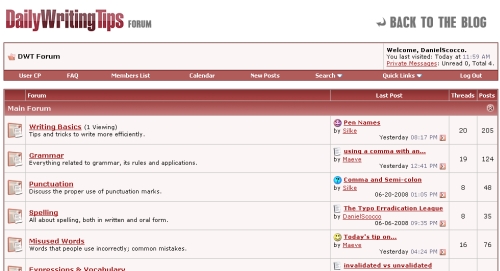
By adding a forum to your website or blog, therefore, you would be creating a new channel for your visitors to interact with the website, with its authors, and with other readers as well.
Should the forum become active, it will probably increase your overall traffic significantly. The members will want to log regularly after all, and they will also produce user generated content, that in turn might attract further visitors or search engine traffic.
Does it work?: Yes, provided your site is big or popular enough to get an active forum going on. You need a good member base to keep the content coming and to get the questions answered, else you will end up with a ghost forum.
There is no magic number here, but you should wait for 5,000 or more daily unique visitors before launching a forum. Just consider that we had around 10,000 RSS readers on DailyWritingTips when we launched the DWT Forum, and out of those only 400 or so registered for the Forum.
That was enough to get the forum going on, especially because our readers are very engaged with the topic, but it should illustrate that getting members is not as easy as it sounds.
How to get started: If you already have a decent amount of traffic and an active community around your site or blog, you just need to select the forum software you want to use and you are ready to go.
There are some good open source solutions available, the most popular one being phpBB.
If you have some money to spend, however, I would recommend going with vBulletin. The single user license costs $160, but it is well worth it, especially if you consider the support you will be getting for one year.
Once your forum is up you will need to give some initial boost. You can write an article on your site about it, put some badges around linking to the forum, or even create a small competition with prizes for people that register on the forum.
Over to the readers: Have you created a forum before? What do you think are the main difficulties to get one rolling? Are they worth the results?
Website Traffic Series
- Part 1: Web Design and CSS Galleries
- Part 2: Blog Carnivals
- Part 3: Leave Comments on Other Blogs
- Part 4: Faking A Website Sale
- Part 5: Pulling an April Fools Prank
- Part 6: Using Forum Signatures
- Part 7: Putting A Blog on Your Static Website
- Part 8: Adding a Forum to Your Site or Blog
- Part 9: Buying Targeted Traffic
- Part 10: Email Signatures
- Part 11: Put Your URL On Online Profiles
- Part 12: Email Bloggers to Showcase Your Best Content
- Part 13: Faking a Hacker Attack
- Part 14: Promoting Your Content on Social Bookmarking Sites
- Part 15: Promoting Posts That Link to You on Social Bookmarking Sites
- Part 16: Promoting Your Content on Social Networking Sites
- Part 17: Using Article Directories
- Part 18: Exchanging Links with Partner Sites
Forums are a great way to get repeat traffic. A succesful forum all depends on the popularity of the site. The more popular the more action on the forum
Adding a forum to your own domain or blog is of no use unless if you do not have a good traffic or at least some 1000 visits a day. After adding a new forum, first of all admin should create a new issue to pick up the heat. Other wise of course it will be ghost forum without any visitors.
here are few tips for ranking the page in google.
check it out.
Ci sono tantissimi componenti che possono implementare o arricchire un sito web..il tutto ovviamente in relazione al traffico ed alle aspettative dei navigatori. Quindi, dal mio punto di vista, risulterebbe inutile mettere troppa “carne a cuocere” se effettivamente non ce n’è l’esigenza! Ciao
Spam, spam and more spam! The biggest problem I encountered when I ran a forum was the time to edit / purge the forum of spam – this seemed to really spoil the fun – and some of the posts could be offensive.
Its hard to make money from a forum beyond the cost of hosting – so its got to be an area you are very interested in.
Forums are a great way to get repeat traffic. A succesful forum all depends on the popularity of the site. The more popular the more action on the forum
Hi Daniel,
What will be the initial investment? I had a look at phbb forum but I couldn’t find an option to host on my own domain, I don’t wanna host it on their free sub domain.
Hi daniel
Just wanted to know what steps to follow… to setup up a forum on my blog which got integrated with the blog itself?
please shed some light on this.
I had a forum previously but due to time constraints I could not keep it going, but I still get traffic from it.
so I have added a great little forum (Simple:Press Forum) to my WP blog now and slowly getting a few people to register but it wont reach the traffic/users as previously.
so my tip (as mentioned by other commenters) treat it seperatly from your blog/site and be ready to spend a lot of time reading it/moderating it/sorting out issues with the users or get a moderating in if you can afford it..
We agree with the first commenter – there is absolutely no use of having an empty forum with no members — it serves as a negative aspect if that is the case. You don’t want people to immediately assume you have no readers/visitors and a forum is exactly a way to indicate that if you truly don’t.
“Forums aren’t a walk in the park. They do take a lot of work to run.”
This is very true. I started several forums in my years and all have
been complete failures because they lacked members. Except my
new forum which has a paid membership.
It’s weird, that a paid membership forum can be a success while free
to join forums fail every day.
The difference with my new forum is that I am offering my expertise
as a consultant which means clients get me for a very low rate.
There are already hundreds/thousands of forums for socializing and
mindless chit chat.
People will pay for information and you will not need many paid
members.
just a thought,
Bompa
I started a forum for a promotional products company I work with, but it seems our audience is the sort that likes to lurk but never speak up. I’ve had a couple of people sign up and I monitor their activities. They read the thread and keep coming back, but they never say anything! What could I be doing wrong?
Starting a forum is easy, but making it take off can be hard, especially for specialized markets, for example, businessmen who source from China. Am sorry to say I gave up after some time and focused on the blog, which was more successful (the readers are quiet too, but our conversion rate is high).
@DevJargon, definitely. And I think that a dead forum is worse than no forum at all.
@Todd, I think that the size required might actually vary depending on the niche, and on the existence of alternative forums already.
@Rajaie AlKorani, well putting the software up is not hard at all. Organizing it, moderating, and making it grow over the time is not such an easy task though. But a lot is related the popularity of the anchor website.
@Everyday Finance, no you can not host a forum inside blogger. Blogger is a blogging platform, so you can only blog there. In order to have a forum you need to have your own domain hosted on a server.
I would not suggest going with open posts also, the spam would be massive.
@Return To Manliness, the technical part is pretty easy, it is almost like installing WordPress or any other server side software. I might do a post about it in the future though.
@WhitDawg, yeah those are some good ideas to get the momentum going on the Forum.
@The Blogger Tips, vBulletin is quite good for blocking spam, I have not had any problems so far.
@Rhys – Retro Garden, yeah if the niche is pretty small and if you have some passionate readers this could work with a traffic far smaller than 5k uniques a day.
@Trevor, that should be a minor risk, and can be easily solved with a moderator.
@Rajaie AlKorani
They actually almost never run by themselves. You need to moderate users and posts. Managing a forum can be very hard work if you don’t have a couple of dedicated people (even then it can be very hard).
Forums aren’t a walk in the park. They do take a lot of work to run.
I put a forum on my site in the early days of its existence (first two weeks) after about two months someone posted and had a desire to help it grow. Since then my 4 month old website has 90 or so forum members and even though it’s not big… it’s a great community.
I say go for it. (Right now the site gets 3,000+ uniques a day, but that doesn’t mean you shouldn’t try it if you have less)
I’ve always avoided running a forum because of concerns over what people might say on it. Spam I can live with, what worries me is the possibility of people posting offensive or even libellous material on my website. I don’t know what the legal situation is on that and can’t afford to find out!
It seems to me that this is the key point:
A forum cannot create a community by itself.
A forum can only help an existing (even nascent) community talk to itself.
Matt
It’s far easier in the niches which are just small enough, that was meant to say 🙂
It’s far easier in the
Oh and I’d never use phpBB. To spammy and hackable. I do recommend bbpress, which I use for the Retro Garden Forum
I realy have no idea for how to build a forum to a blog!!! Thanks a lot!
The main difficulties have to be getting enough content on the forum to entice people to join. No one will join a dead forum unless you were to pay them to join and post which is both ethically wrong and would lead to a lack of quality posting and content.
I feel the main key to a succesfull forum has to be the traffic you have coming to the website before hand, if you have enough traffic then give it a go.
Will.
Can a forum be hosted from a Blogger blog or does it have to be a WordPress/other type platform?
I’m not near 5K per day, but might be able to make it work with less for a given niche.
Could also start with open posting and no registration? I presume this would introduce some spam problems, but perhaps this enables an initial kickoff period to get people to start posting, then you force the enrollment.
Interested in thoughts and more mechanics on implementation, especially if relevant to Blogger.
Thanks!
Ah I forgot to include on strategy you can use also: removing comments and encouraging people to join the conversation via the Forum.
It might upset some readers, but it might also work in the long run. This is what Steve Pavlina has been doing for a while
5k a day sounds about right.
OR perhaps if you a ongoing focused conversation across a series os posts.
Previously encountered many people like to spam the forum, have removed it from my blog.
5,000 unique visitors a day….yeesh! It will be a while before I consider a forum. 😉
You are really going to have to put some effort into the forum when it launches if it launches with zero members.
How about you get everyone (as many as possible) to pre-register (regular visitors) and say launch with a minimum of 500 members ? Give the first 1000 members a better standing within the forum, a bit like how at ebaumsworld you have to pay to access some of the better forum functions ? Oh I dunno, food for thought !
Would have liked to have seen how exactly you put it up on your site. Us folks that are not HTML savvy would love to know how to do this on our sites as easily as possible. Not anywhere near 5,000 visitors a day, but hope to be someday. Maybe when I get to 5,000 daily, I will not need the how-to…. 🙂
I’ve never personally started a forum before, but how hard can it be?
One of the things I like about forums, is that after a period of time, they will run themselves.
It can’t be stated enough how important it is to have a HUGE audience before going ahead with a forum. You’re better off not having one than to have one with only a couple of posts.
I have seen many, many forums fail from the lack of members. Make sure that you can keep your forum active (even if that means you maybe have to pay people to post). If visitors come and see an empty forum, they’ll leave.
We’ve been planning a forum over at devjargon for a while now and we’re just waiting for the traffic to rise to the point where we can justify it and sustain a forum.
If you have a successful blog, a forum is a great addition.