
A couple of weeks ago I came across an interesting tool to measure the loading speed of your website. The tool was created by Pingdom, and it basically loads your website, tracking the time at each stage of the process. It’s called Pingdom Website Speed Test.
Once the test completes you’ll with a score (varies from 0 to 100), the number of requests performed (i.e., how many elements were loaded), the total load time and the total size of your page.
Here’s how DailyBlogTips scored:
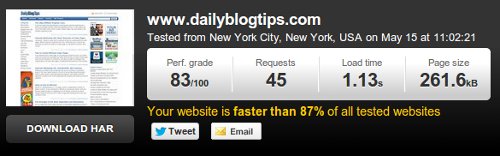
On top of that you’ll also get access to a detailed break-down of all the elements that were loaded while opening your website, and the respective time that it took to load each of them. This information is quite valid to help you optimize your load time.
There are other tools that produce a similar report, but most work as browser extensions, so you need to install them forehand. As a web tool that you can use right away this is one of the best I’ve found, so check it out.
This tool is awesome! I use it all the time to tweak my site. There is nothing worse than waiting for a site to load.
I get noticed about this tool from your post and never met or hear before.
Time load is crucial both from seo and user experience view and every website owner must paying very close attention.
Google and search engines will rank better a faster loading site. And nobody love or will wait your site to load for a few minutes.
So don’t waste time, go! 🙂
Loading speed of the website also depends on your internet speed and internet connectivity. Is it not?
Daniel same tool is used by me for testing speed of my all blogs. Thanks for sharing it with us.
Thanks for this. I was just what I was searching for. In last few days I noticed that one of mine websites become a little slower, but with this test everything seams fine.
Interesting, although my page size tests out a bit larger than yours. Time to find out how to optimize my site.
Thank you for the useful tool! My speed is 6.2s 🙁
I am going to try another one too.
Will have to work on my site optimisation.
Thanks again and good lusk!
The review you did about pingdom website speed test was very helpful, and I did have a test to personally see for myself the results. It really did show statistics prior to the loading. It shows the total load time and the total size of your page.
Thanks for sharing
I quite frequently use Google Pagespeed checker. Thanks for suggesting pingdom
Thanks for the site. I’ll be sure to check it out to see where to optimize my page.
I love this wonderful set of tools you published here!
Thank you
Thanks for this website Daniel, My page speed is 5.17 seconds is it a bad loading time or is it ok to go with?
Thanks for sharing the useful tool, Daniel. Mine is similar to yours.
Waiting for your reply to my email Daniel.
Thanks for sharing this. I just used the tool and found my site loaded in 3.17 seconds, faster than 51% of sites. I like how it shows you the load times of different parts of the page. That will be helpful for finding out how to speed up a website.
Definitely need to check this out. I feel like site speed is very underrated, and now that Google is factoring it into rankings, I think tools like this are going to become much more popular.
Thanks for the heads-up.
Jake
I think GTMetrix is best as it tells me what to to speed up my website.
This is a great tip. I never tried any website speed test before. I thought this tool is unnecessary for website optimization. Anyway, this is worth a try. Thanks for sharing! 🙂
Awesome! Thank you very much for sharing this tool. Really helpful in tracking the speed of our site! The result can be used in determining what steps to take to improve and optimize the site performance.
Pingdom is a really good tool, I actually used it once or twice before seeing it covered here. I use it to test any sites for my colleague, a website designer.
It’s reliable, quick, and simple to use.
I use Google Page Speed. For some reason I always get an error message when I try using Pingdom. Do you have any tips for speeding up your website after testing?
I found Pingdom several months ago. But I have no way to interpret the results of HOW to optimized based on those results. Hmmm….I know my site is slow, but I don’t know why.
Last week i run with my blog about cracks, hacks to games and other gifts. Beginning was difficult, but with your tips my positioning can be easy! WordPress is very helpful for beginner bloggers. `Now playing games will be easier’!
Fast loading is important for readers, people often wait for around 5 sec for a blog to load up if not, they leave. Thanks for sharing this great tool, I’d definitely use this to load up my blog faster.
That’s actually a pretty cool service. I tested it out on my main blog and ended up with 85/100. I know there is room for improvement but I’m a numbers guy so I’m actually quite pleased with the initial results.
I also try my site there, but very sad, my score is very low, it is
Perf. grade- 71/100
Requests- 61
Load time-1.96s
Page size- 1.0MB-
Is there any way to reduce the page size and make it faster, As I see your website its only 261 kb and my site is 1mb.
Any tips?
Have you noticed any SEO benefit in regards to page load speeds? I have experimented with this in the past but have not really noticed much benefit. I mean of course for user experience a quick page load is key, but I think as long as it is not a ridiculously long load time things are fine.
In total agreement on this. Pingdom’s breakdown is a big help for prioritizing what needs to be tackled first.
I’ve never used GTMertix, but it seems like it has a good grading system as well.
I’ve been using GTMetrix and Pingdom together to measure the speed of the website. I find GTMetrix more feature rich than Pingdom’s tool, but it is good to have independent results.