

Like it or not, if you want to be successful on the Internet, you will need to generate traffic to your websites or blogs. It does not matter if your goal is to make money with advertising, to sell ebooks, to generate leads to your business or simply to share your ideas; if people are not visiting your site your efforts will be worthless.
That is why I decided to start this “Website Traffic Series,” where on each post I will cover one different traffic generation strategy. Now I am not trying to reinvent the wheel, since I know that there are plenty of advice out there on this topic. What I will do is to summarize what is known about each strategy, and break it down into “Concept,” “Doest it work?” and “How to get started.” That is, I want to provide some practical advice and a reality check with my own experiences at the same time.
If things go all right this so be a long series, so stay tuned!
Part 1: Web Design and CSS Galleries
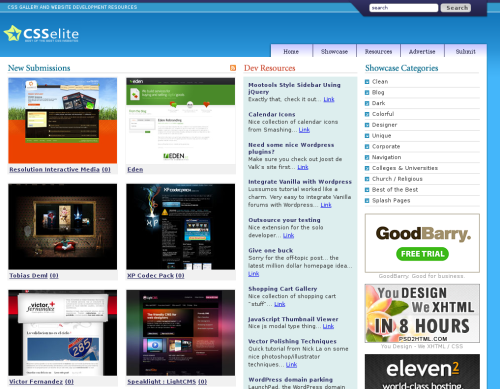
Concept: There are literally hundreds of web design and CSS galleries around the Internet. Basically these galleries gather and filter creative and good looking websites from around the world (mostly CSS based, but some also feature Flash and XHTML) and showcase them for the visitors.
Some of these galleries are extremely popular, and they can send thousands of visitors your way if you get featured there. There is also a bowling effect from smaller galleries that end up picking the designs featured on the top sites, so the overall traffic boost could last several days.
Does it work?: Yes, provided you can get featured on one of the top rated galleries. Achieving that is the hard part, though. A unique design will not suffice, it must be appealing and creative.
Daily Blog Tips has a unique design, for instance, but I doubt that it would get featured on one of these galleries because the design is too simple and minimalistic.
Another point to consider is the quality of the traffic. Most of the incoming visitors from the galleries will be interested in your design, and not necessarily in your content. Should you have a good strategy to convert them (i.e. highlights of your best content, clear subscription options and so on), however, there is good chance that some of these visitors will like your site and return later for the content and not for the design alone.
How to get started: First of all you need to have a creative and appealing design. If you are good with CSS you could do it yourself, otherwise hire a professional designer. You can improve your chances by using a clever color scheme, innovative navigation menus and so on.
Once the design is in place you will just need submit it to the galleries and cross your fingers. Check The Great Website Design Gallery Roundup for a complete list of the galleries and a detailed description of the features included on each one.
Over to the readers: Have you had any experience with web design or CSS galleries in the past? How did it work out?
Website Traffic Series
- Part 1: Web Design and CSS Galleries
- Part 2: Blog Carnivals
- Part 3: Leave Comments on Other Blogs
- Part 4: Faking A Website Sale
- Part 5: Pulling an April Fools Prank
- Part 6: Using Forum Signatures
- Part 7: Putting A Blog on Your Static Website
- Part 8: Adding a Forum to Your Site or Blog
- Part 9: Buying Targeted Traffic
- Part 10: Email Signatures
- Part 11: Put Your URL On Online Profiles
- Part 12: Email Bloggers to Showcase Your Best Content
- Part 13: Faking a Hacker Attack
- Part 14: Promoting Your Content on Social Bookmarking Sites
- Part 15: Promoting Posts That Link to You on Social Bookmarking Sites
- Part 16: Promoting Your Content on Social Networking Sites
- Part 17: Using Article Directories
- Part 18: Exchanging Links with Partner Sites
Very nice sharing. Thank you…
thanks, you right about the css. but is hard to creat one
Oh no…
If this is part 1, I’ve fallen at the first hurdle.
No way my website would get into one of those galleries.
It seems that some folks have misunderstood your post as advice on upgrading their theme.That goes along with my belief that the average blogger is NOT a web designer by any stretch of the imagination. Most bloggers get started and work from easy to understand instructions that come from well built tools like WordPress and Blogger.
Nice article. Check out The CSS Gallery List where you can submit your site to dozens of galleries all from one form.
Nice article. I personally like to submit my websites to
cool information and very important
I recognize I need to improve my layout, and am working on that. Im glad Ive stumbled onto your site for other tips. Thanks!!
I like to suggest everyone a celebrity image gallery which is free, unique and really very good.
Those who want to have a little bit of entertainment in between their work, can take a break and watch freeuniqueimages.com. Unique thing
about this site is that…only full body decent images of more than 200 celebrities are there with full emphasis on great figure. There are
RSS, forums, blogs & chat features also where you can connect with each other.
hi, i am blogger from indonesia
I want to upgrade to a new theme but can’t find anything remotely close. I guess I am gonna have to design it myself unless I stumble across It
Thank for the advice!
Tell it like it is! I love it, many people that I’ve built websites for expect magic to happen. They don’t realise that there is billions of websites online and if they don’t stand out or not even noticed there is no point of having a website.
@Michal, just email me I will be glad to help.
This can get you some nice backlinks, but be prepared for a consistent stream of irrelevant visits – web design enthusiasts checking out your design.
The guys at YoungGoGetter.com got a lot of traffic from web galleries and have a post somewhere there about the results.
I recognize I need to improve my layout, and am working on that. I’m glad I’ve stumbled onto your site for other tips. Thanks!!
Oops, I just reread your post, and realised that I’d got the wrong end of the stick. In terms of submitting sites to the css galleries, you would really need the help of a web designer unless you have excellent skills yourself.
Actually it can be pretty difficult to drive traffic to a css gallery on its own merit. My gallery’s focus is very niche (WordPress sites using Premium Themes), but I’m working towards broadening its scope by integrating a blog section with articles on customising your theme.
Well, I am blogging at Blogger, I would like to change it’s look. The column at right does not look accessible. I am too old to learn css and php, (I tried) so I just decided to be satisfied with what I have. Generating traffic is a big mystery to me yet, so I am really curious, what secrets did you prepared for us Actually I would welcome a little conversation with you (by email), if it is not too demanding.
Daniel,
team ray, WordPress is php based, but you could design a website just using CSS and HTML also.
i am familiar with css and html
Daniel, your theme is simple but effective. I want to have a theme like yours, but I know little about CSS or PHP, and don’t want to pay for a theme yet, which may be one reason why I haven’t made much money up till now.
Thanks Daniel…you’ve helped to solidify my decision.
hey! thanks for such a wonderful post, it was sure useful. Eager awaiting for the rest of the series
If you got the cash and already have a feeling of the potentials of the blog that getting a new design right now could be a smart idea. It will just make you grow faster.
Thanks for posting this article…the timing of this subject matter couldn’t have been better for me personally.