
Are you looking for a side hustle to make extra money?
If you want to earn money without effort, advertising your car is the best option for you.
By placing advertising decals on your car, you can passively earn money while you go about your daily routine.
Companies will pay you to showcase their brand on your vehicle, providing a simple way to make extra income without much effort.
Plus, it’s a great way to advertise products or services to a wider audience.
So, if you’re looking for a side hustle that doesn’t require a lot of time or energy, consider turning your car into a mobile advertising platform.
Is Carvertise for You? Carvertise Review 2025
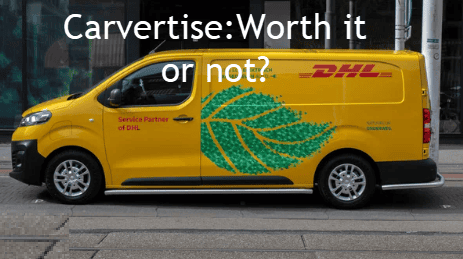
It is important to note that participating in Carvertise may not be suitable for everyone. If you are uncomfortable with having advertising on your car, do not drive frequently, or do not want to commit to displaying ads on your vehicle, then Carvertise may not be the right fit for you.
Carvertise may be a good option for you if you meet the following criteria:
- You have a car that you can use as a mobile billboard for advertising purposes.
- You drive frequently and in areas with high visibility for maximum exposure.
- You are comfortable with advertising decals on your car for an extended period.
Overall, Carvertise can be a great way to earn extra money by allowing companies to advertise your car, but it is important to carefully consider whether it is the right option for you before signing up.
What is Carvertise?
Carvertise is a company that pays drivers to wrap their cars with advertisement stickers on their cars. Unlike some scams out there, Carvertise is a legitimate business that pays between $450-$1500 per campaign as advertised.
To start working with Carvertise, you can download the Carvertise app from the app store. Once you have the app, you can wrap your car and start getting paid via direct deposit at the end of the campaign. If you decide you no longer want the wrap on your car, you can easily remove the wrap and opt out of further campaigns.
Also, remember that Carvertise doesn’t pay by check, so if someone tells you they’ll send you a check for Carvertise’s work, it’s likely a scam. Make sure to always check with the Better Business Bureau before working with any company like Carvertise or its main competitor, Wrapify.
How does Carvertise Operate?
Carvertise operates by paying drivers to place advertising stickers on their cars. Once a driver signs up with Carvertise, they will be notified when a campaign is available in their area. The drivers are then required to visit a designated installer who will wrap the car with the advertisement.
After the campaign is over, the drivers are paid based on the number of miles they have driven with the advertisement on their car. According to reviews on the BBB website, some drivers have had issues with the accuracy of mileage tracking, so it is important to keep track of their mileage independently.
Drivers can earn anywhere, but it is important to note that some drivers have reported that they were promised $450-$1500 as advertised but never received payment. If you encounter any issues with a campaign or payment, be sure to file a complaint with Carvertise or the BBB.
Remember, Carvertise does not require drivers to pay any fees, so if you are asked to deposit a check or pay for the wrap of your car, it is likely a scam. Lastly, always verify the opportunity’s legitimacy through the official Carvertise.com website before driving for Carvertise.
Carvertise Reviews
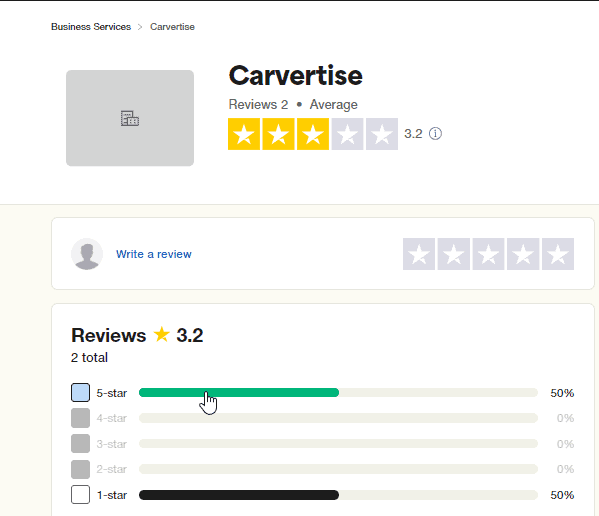
Carvertise Reviews are mixed regarding the experience of drivers who sign up to have stickers on their cars. While some drivers have had positive experiences with Carvertise and have been paid $450-$1500 as advertised, others have had issues with the app not accurately tracking their mileage.
Moreover, this platform is a legit company that pays you to cover your car, but drivers should be cautious of scammers pretending to be Carvertise’s main competitor. The work involves having your car covered and driving a certain number of miles per month to earn money.
Some drivers have reported that they have still not gotten paid after completing campaigns, while others have had no issues with Carvertise legit paying them monthly via direct deposit. If you decide to contract with Carvertise, make sure to carefully read the terms and conditions before depositing the check for the campaign.
A.Positive Reviews
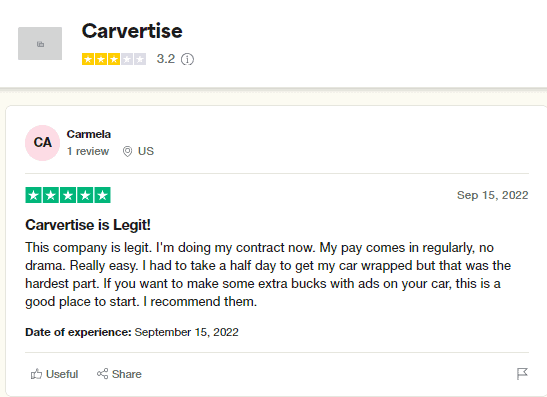
Many drivers who signed up to drive for carvertise in 2023 have reported positive experiences. Testimonials from satisfied customers mention that Carvertise pays drivers $450-$1500, as advertised.
The benefits mentioned by customers include that it’s an easy way to make extra income based on the number of miles you drive and that Carvertise is legit. Drivers have also praised the company for its transparency and reliability.
Moreover, some drivers have reported issues with the app accurately tracking mileage, but overall, they have had a positive experience with Carvertise.
B.Negative Reviews
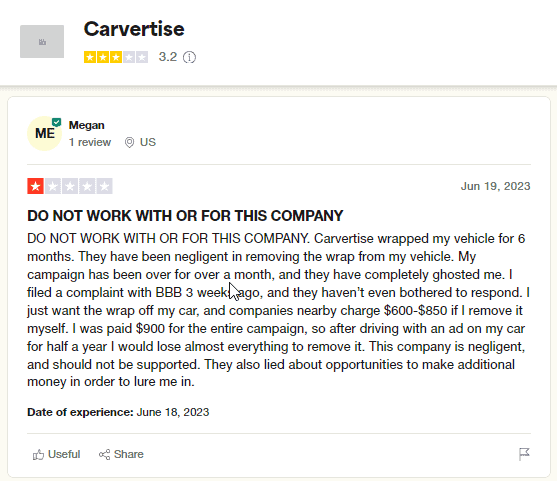
Negative reviews from customers can be detrimental to a company’s reputation. Some complaints include not being paid the promised $450-$1500 per campaign, with some drivers claiming they haven’t received any payment at all. Additionally, customers have reported that the app doesn’t accurately track mileage, leading to discrepancies in payment.
Furthermore, some drivers have experienced issues with companies nearby charging to remove the wrap off their cars, leaving them with unexpected costs. Areas for improvement include better communication from advertising about payment expectations and ensuring that campaigns typically last the agreed-upon timeframe.
Many drivers have expressed frustration with carvertise not delivering on their promises, with some claiming to still have not received payment after their campaign ended. Some have even reported receiving fake checks or being deceived by individuals pretending to be carvertise representatives.
Case Study: Fry’s Kroger Campaign in Phoenix, AZ
Carvertise has proven to be a highly effective advertising medium, particularly in increasing foot traffic to specific retail locations, as evidenced by a detailed case study involving Fry’s Kroger locations in Phoenix, AZ. This example demonstrates how Carvertise’s strategy of using rideshare cars as mobile billboards can significantly boost store visitation and, consequently, potential sales.
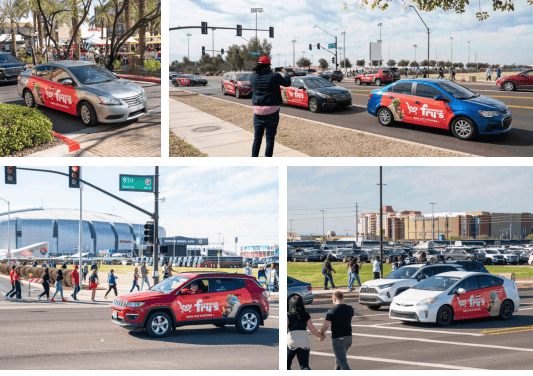
During an 18-week campaign, Fry’s Food Stores launched 75 Carvertise rideshare cars in Phoenix, AZ. These cars were strategically sent to high-traffic events, including Super Bowl LVII and Phoenix Suns home games. The primary objective was to track and measure the impact of mobile advertising on store visits.
Effectiveness of the Campaign
To measure the campaign’s effectiveness, Fry’s Food Stores utilized a combination of methods:
- First, they tracked the number of store visits from customers who mentioned seeing the Carvertise rideshare cars. This data was collected through in-store surveys and the Fry’s Food Stores loyalty app.
- Additionally, Fry’s Food Stores monitored social media engagement and website traffic during the campaign period. They analyzed the impact of the Carvertise rideshare cars on their online presence, looking at metrics such as website visits, social media mentions, and online orders.
- Furthermore, Fry’s Food Stores partnered with Carvertise to track the movement of the rideshare cars using GPS technology. This allowed them to determine which areas of Phoenix had the highest concentration of car sightings and which events generated the most interest.
- Overall, the campaign has been deemed a success, with an increase in in-store visits and online engagement during the 18-week period. The data collected will be used to inform future mobile advertising strategies and drive further growth for Fry’s Food Stores.
How to Get Started with Carvertise
Carvertise is an advertising company that allows drivers to place stickers on their cars. The process is simple , you sign up on their website, and if you qualify, you’ll be told where and when to cover your car. The average driver can expect to make around $100 per month or $25 a week.
Steps to sign up for Carvertise
If you’re interested in signing up for Carvertise, here are the steps you’ll need to take.
- First, you must visit the website and fill out an application. Once you’re approved, the platform will schedule a time for you to have your car covered. This process involves stickers on your car promoting various brands and products.
- While having your car covered can be a simple process, there are some things to keep in mind. For example, you won’t get money until your car is wrapped and the advertising campaign is active. If you need to unwrap your car before the campaign ends, you may be required to pay the wrap removal fee.
- Additionally, if you’re a rideshare or delivery driver, you may need to adjust your schedule to have your car covered and return at the end of the campaign to have it removed. This may require you to take time off your schedule or plan ahead to fit the wrapping and unwrapping appointments into your busy day.
- It’s also important to be cautious and aware of potential fraud. For example, a company that promises to pay you for wrapping your car but never sends checks or asks for money upfront may be a scam.
Earnings Potential
Carvertise is a company that helps individuals earn extra income by advertising on their vehicles. The company claims that you can earn anywhere from $450-$1500 per campaign by covering your car with an advertisement.
However, the reality is that many drivers who have tried to participate in carvertising work have found that they still have not been paid the $450-$1500 as advertised. Some have even been scammed by someone pretending to be from the company. This has left them feeling frustrated and angry at the negligent practices of the company.
However, it can be difficult to actually get money. While participating in its work or a similar program may seem like an easy way to earn a few extra dollars, it is important to be cautious and do your research before signing up. Make sure to read reviews from other drivers and ask questions before committing to anything.
Fraud Warning
Be cautious of offers promising to pay you to wrap your vehicle with an advertisement. Companies like Wrapify may claim to pay you $450-$1500 or $100 per month, but many individuals have reported never receiving payment despite getting their car wrapped.
The typical scam involves the company sending you a check for $450-$1500 as advertised, asking you to deposit it, and then sending a portion back.
If you try to send the money back, the original check will bounce, leaving you owing the company money. Protect yourself from these fraudulent schemes, and do not take time off your schedule to have your car wrapped.
Carvertise: Worth it or not?
Carvertise offers drivers an opportunity to earn income by wrapping their cars with advertisements. It seems like a lucrative deal with potential earnings ranging from $450-$1500. However, the reality may not be as glamorous as advertised. Many drivers have reported that they are still waiting to receive their promised payment, with some claiming that they have not gotten a single cent despite having their cars covered for months.
This platform requires from drivers to average at least 25 miles per week to earn the same amount. This can be a hassle for some drivers who must take time off their schedule to meet the mileage requirement. Additionally, the process of getting your car covered can be time-consuming, with some drivers reporting that they had to schedule to have their car covered and repeat the process if the wrap came off their car.
Despite these challenges, it has helped thousands of drivers earn income through advertising campaigns. However, with the impact of COVID-19 on the economy, drivers may want to carefully consider if the potential earnings are worth the time and effort required to participate in a campaign.
Wrapping Up
Carvertise isn’t always as lucrative as it may seem. While some rideshare drivers have reported making between $450-$1500 per campaign, others have had less positive experiences.
However, there are also instances where the company is negligent or completely ghosted their drivers. It’s important to consider whether the potential earnings of around $100 per month or $25 a week are worth the time off my schedule to have my car professionally installed with a full wrap.