
Best Wordpress Plugins: Custom Query String

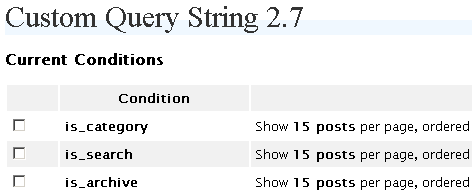
Wordpress allows the user to set the number of posts that are to be displayed on every page. The problem with that feature on the Control Panel is that it affects all the types of pages around the blog. If you set this number to 5 you will have 5 posts on the Homepage, on the categories, on search results and so on.

As you can notice from my sidebar, the only way for the readers to navigate around the blog is through the categories. Having only 5 posts displayed on each category page (which is the number I use for the Homepage) is not efficient since it would force readers to browse across several pages before being able to see all the posts contained there.
customquerystring1.png

The solution for this problem is the Custom Querry String plugin (download link) . After installing it you will be able to set the number of posts (custom queries) for every single page on your website. Here are some of the pages that you will be able to customize:

  • author
  • archive
  • category
  • year
  • month
  • day
  • search
  • feed
  • home

Got Your Free eBook?


  • Subscribe to the Daily Blog Tips newsletter and you will be able to download the "Make Money Blogging" eBook for free.
  • You will also receive tips to improve your blog, strategies to make money and useful resources from around the web.
ebook cover

166 Responses to “Best Wordpress Plugins: Custom Query String”

  1. Adrian on March 1st, 2007 4:45 am

    Solid! Thanks for the heads up. Great blog, useful.

  2. Anthony Baggett on March 1st, 2007 5:58 am

    Great plug-in, and a new one to me. Thanks……..downloading now.

  3. Daniel on March 1st, 2007 6:30 am

    Installation was really smooth also, one of the best plugins I have played with.

  4. Rory on March 1st, 2007 9:15 am

    Is there a hack which forces partial posts, so that the whole post doesn’t show? That’s a whole lot of scrolling if you set it to 10 or 15.

    Great plugin, by the way.

  5. George on March 1st, 2007 10:27 am

    Great find Daniel! I will have to check that out. I have been wanting to increase the number of posts in my archives for a long while.

    Thanks,

    George

  6. Amit Karmakar on March 1st, 2007 2:07 pm

    Been using this one for about 2 odd years, and its priceless!!!!!

  7. Everton on March 1st, 2007 6:10 pm

    now that is a useful find – thanks. Will implement at the weekend

  8. Daniel on March 2nd, 2007 3:31 am

    Rory, I just posted an article with an answer to your question, you can read it here:

    http://www.dailyblogtips.com/h.....-excerpts/

  9. inspirationbit on March 3rd, 2007 9:46 am

    That’s a useful plugin indeed. Thanks.

  10. Rolando on May 19th, 2007 8:48 pm

    Dang, too cool, thank you!

  11. Polliwog on May 30th, 2007 9:21 pm

    wow. I’ve been searching for hours for the answer to this problem and I find the solution here, where I should have looked in the very first place! Thanks so much Daniel. Your blog is such a valuable resource.

  12. Daniel on June 10th, 2007 7:45 pm

    This may be of topic.

    But I am looking for this wp plugins:- Different Sidebar by Categories & Sub-Categories

    Is it available? Can’t find anywhere.

    Reasons for this feature is that I would like start a generic wordpress blog.

    Generic means no restrictions on the topics. It could be politic, sports, marketing, business… anything on earth and beyond.

    As such, i would like to have different sidebar by categories and subcategories.

    For example, in politic category, I may have different blogroll to the one in sports category.

    It should be opened for everything that could be found on sidebar and not resticred to blogroll.

    I see this as a very useful feature to maximize a blog relevancies as well as the advertising dollars.

  13. Ducked.nl on July 18th, 2007 10:48 am

    Thx a lot for the update! Is it also compatible with WP 2.2.x ?

    See it in action here: http://www.ducked.nl

    Grtz, Andy

  14. Bertrand on August 1st, 2007 8:45 pm

    Excellent plugin Daniel. That was exactly what I needed so thanks a lot ;)

    Bertrand (from France)

  15. Bertrand on August 20th, 2007 10:16 am

    Hi,

    I’ve got a strange trouble.

    Everything seems to word perfectly (8 posts on home, 15 on others pages) but in fact, it doesn’t display june posts… So strange, does anyone meet the same trouble or have a solution ?

    Thanks !

  16. Europasobreruedas on April 19th, 2008 3:05 pm

    Thank you, I have finally found what he was looking for and it works perfectly. Thanks again and a greeting

  17. Ville on June 27th, 2008 5:55 am

    I’m having a problem with Custom Query String, WP 2.5.1, and K2 RC6. If I define “is_home 1 posts date DESC” and “is_archive 1 posts date DESC”, the home page shows one post, but clicking on the “Older” link above the article produces and archive page with as many posts as defined at Settings > Reading > Blog pages show at most (which is 10 by default). The link above the article shows the number of pages as if each message would be displayed on its own page (27 in case of the blog I’m working on), but since the archive pages are not affected by the is_archive custom query string, the content runs out after three archive pages, and on the fourth page (4 out of 27) a “Not Found” message is displayed.

    Seems something has changed in WP 2.5.1 or perhaps K2 adds something to the mix. It would be great to see the issue fixed as this would be otherwise a perfect plugin!

  18. Ville on June 27th, 2008 11:10 pm

    It’s the K2 (currently testing RC6) that causes the trouble. When the default theme is in use, the problem goes away. Unfortunately I really like K2. Any chance the plugin could be made to coexist with the most popular 3rd party WP theme? :)

  19. Joe, Designer on July 24th, 2008 12:23 am

    Custom Query String 2.7 doesn’t seem to work with WordPress 2.6

    An error is produced at the bottom of the category pages. Deactvate the plugin and the error goes away.

    The error is

    wp_categories’ doesn’t exist for query SELECT cat_ID FROM wp_categories WHERE category_nicename = blah blah blah

    Anyone have a solution?

  20. Daniel Scocco on July 24th, 2008 8:04 am

    @Ville and Joe, it is working fine here both on 2.5.1. and 2.6. Make sure it is not just clashing with another plugin you might have installed.

  21. Joe, Web Design on July 24th, 2008 10:26 am

    Well, the good and the bad news is….

    I deactivated everything except CQS. The error continued to display at the bottom of the page.

    I guess that leaves me with my answer. It has to be something to do with the actual database. I must mention that this was a very old WP install (1.5.*) before the upgrade and it did run a hitch concerning the categories.

    I guess I will just customize the looop and do it the hard way for now.

    Thanks.

  22. Ian on July 24th, 2008 10:29 am

    Daniel, why are you so dismissive? You need to check the facts out before giving the sound advice of “well it works for me so…”

    The plugin you recommend is broken for wordpress 2.6

    If I were you I’d check your error logs just to make sure your site is not affected.

    There is an alterantive plugin that does exactly the same thing called “Custom Query String Reloaded” and it works just fine on WP 2.5.1 and Wordpress 2.6.

    http://moshublog.com/2007/10/3.....g-support/

  23. Ian on July 24th, 2008 10:39 am

    Oh and Joe, I sent you I went to your site and sent you a message.

    Ville, you could try the Reloaded plugin also, I don’t know if it’ll work for you though.

  24. Daniel Scocco on July 24th, 2008 1:39 pm

    @Ian, I just said the plugin is working for me on 2.5.1 and 2.6, I didn’t say it was 2.6 compatible or anything.

    Also not sure if you noticed, but I recommended this plugin on March 2007.

    I guess you need to check the facts also.

  25. Joe, Web Design on July 24th, 2008 1:53 pm

    Awesome!

    Custom Query String Reloaded fixed it.
    This according to the version numbers would make it Custom Query String 2.9.

    Thanks for all the help.

  26. Ian on July 24th, 2008 2:01 pm

    @Daniel – I noticed when you wrote the post. My comments were in response to your advice to Joe and Ville

    “Ville and Joe, it is working fine here both on 2.5.1. and 2.6. Make sure it is not just clashing with another plugin you might have installed.”

    Maybe you could include include an edit at the bottom of the post recommending the Reloaded Plugin for those who are having problems.

    It works in exactly the same way as 2.7 so you instructions are still applicable.

    Don’t think I’m trying to pick holes Daniel. I’m just trying to help. I had the same problem with the plugin as Joe so just relaying what works :)

  27. Ian on July 24th, 2008 2:02 pm

    No problem Joe :)

  28. Wordpress Blog Setup on July 27th, 2008 4:45 am

    Excellent wordpress set up advice cheers

  29. Cirilo Veloso Moraes on August 26th, 2008 2:07 pm

    Its a very cool plugin.
    Tks, dude.
    See ya.

  30. Ville on August 29th, 2008 6:32 pm

    I got busy with some server stuff for a while and missed these comments for a while. Anyway, I just upgraded to WP 2.6.1, K2 1.0-RC7, and installed CQS 2.9 (’reloaded’). Now the pagination seems to work on the front page (i.e. only the most recent post on the front page and correct number of “history” pages indicated), but is_archive is not responsive. This may again be because of K2, but the value set by is_archive is not respected and any number of archive items are shown on an archive page.

    The front-page pagination was the most important issue for me, so I can live with this now, but just wanted to let you know the is_archive may be something to look into (with K2 installed).

    I tried the 2.7 also, and with the above mentioned versions it seems to work the same way — i.e. no difference between 2.7 and 2.9.

  31. iPod Dude on October 15th, 2008 2:51 pm

    Is there a way to search for items in certain categroies using this plugin? I have been looking all over for a plugin that would allow me to do this.

  32. Runescape Forums on October 18th, 2008 1:56 pm

    Thanks for the custom-query-string mod :D it made everything faster

  33. Ben on November 4th, 2008 9:43 pm

    Does this mean also when someone does a search on Google, will the user be directed to the landing page? Just curious

  34. Sameer Dhoot on November 12th, 2008 12:07 pm

    This is very useful plugin. Saved me a lot of time.

  35. Caustin on November 20th, 2008 5:24 pm

    This is a great plugin. I was wondering if anyone knew whether this plugin was still being developed, and, if so, by whom? I tried the website of the author, but could not find a mention of the plugin.

    If not, here is what I am wanting to do.

    The CQS plugin allows you to show a specific number of posts or all of them. If you choose a specific number of posts, ordered by, say, the title, I would love to see a numbered pagination option. So, if you have 30 posts in a category, and you want only 10 to show at a time, there would be “page 2″ and “page3″ pagination links to view the remainder of the posts in the specified order.

    Any ideas.

    Thanks in advance.

  36. Amit Banerjee on January 4th, 2009 4:07 pm

    took me 2 weeks to find this one…….but at last I have made it.
    Thanks daniel

    One more question : My blog is about technology and computers.i want to start a new category on programming.But i dont want to show the posts of that category on my home page .I want to show those posts on the category page instead.Any plugin ?

    Or should i start another Blog on a subdomain ? if the 1st trick is possible that would be a great help.

  37. tom on January 4th, 2009 6:26 pm

    hi all. i’m to have my front page display only the most recent post, but then we you click “ealier posts” you can see 10. i’m figured i could do this with CQS with the “is_paged”, but when set “is_paged” to anything then my “earlier posts” link actually stops working.

    maybe a bug with my theme?

  38. tom on January 4th, 2009 6:34 pm

    quick update – noticed it’s not a theme problem. tried the same thing with the default theme and i have the same problem.

  39. Rod on January 5th, 2009 2:14 pm

    Hi all. I use the CQS plugin… and I also like Nex Gen gallery as well. I too give a plugin I might like a try, then if it doesn’t suit me I delete it… there are so many P-ins out there it would be easy for some to go overboard…

    Thanks for DBT… I appreciate all the work involved.

    Rod :-)

  40. Laurence Flynn on January 7th, 2009 8:14 am

    This website is a goldmine. Thanks for this plugin. You have a new subscriber!

  41. Laurence Flynn on January 10th, 2009 11:20 pm

    I think this doesn’t work as intended. When trying to set a rule for a category it simply lists it as “cat_” and the Setting > Reading value is not overridden.

  42. Bang Kritikus on January 28th, 2009 4:05 am

    follower widgets

  43. PlanetPhillip on March 31st, 2009 5:01 am

    This is a fantastic plugin. Unfortunately when I moved host it stopped working due to a change on php version.

    And I am guessing that as other hosts update their php version more people will get the same.

    I get the following error
    “Warning: Call-time pass-by-reference has been deprecated; If you would like to pass it by reference, modify the declaration of do_action(). If you would like to enable call-time pass-by-reference, you can set allow_call_time_pass_reference to true in your INI file in /planetphillip.com/wp-content/plugins/cqs/custom-query-string.php on line 118″

    I have been told that the solution is to create a custom php.INI but I’m not technically proficient enough with shell or php to even think about that.

    Can anybody help or suggest something?

    TIA

  44. Tech Blog on March 31st, 2009 10:46 pm

    Thats for the custom query strings :) it really helped speed things up

  45. Soumen on May 2nd, 2009 7:52 am

    Thanks a lot Daniel

  46. Jane on May 12th, 2009 10:13 pm

    I’m a beginner to this; I have your plugin uploaded and activated, and it’s open for editing, but I can’t figure out what to modify in order to allow multiple posts per page. Can you please help me with this?

Got something to say?


Sponsors

web directory Performance Based SEO Blog or Build an SBI! Site Flex Theme for WordPress 20% Off on Shared Hosting BlueSEO Say Goodbuy to AdSense Advertise Here

Recent Articles