Deep Blue Wordpress Theme Released

I am glad to finally release the first free Wordpress theme by Daily Blog Tips. The plan is to release a new one every couple of months. All themes will be functional and optimized, since I know what bloggers are looking for when they download a theme for their site.

deepblue1.png

Deep Blue is an elegant theme created by Nathan Rice. The theme was specifically designed to include a 336×280 Adsense unit on top of the sidebar. Google confirms that this is the best performing Adsense format, so the layout should enable bloggers to monetize their site efficiently without compromising the user experience.

Nathan did an outstanding job creating many useful features for the theme, including:

  • Easy Adsense Integration: The theme comes with a ad.php file where you just need to paste your Adsense code and it will be displayed on the sidebar automatically
  • Search Engine Optimization: The meta and title tags are already optimized for search engines.
  • Easy Feedburner Integration: The “Theme Options” section inside the Wordpress control panel enables the blogger to insert his Feedburner URL, which will be used all over the theme.
  • Customizable Sidebar: The sidebar already comes with a pretty “Popular Posts” section, and it splits automatically into two sidebars below it.
  • Expandable Menu Tabs: The tabs will automatically resize to match the size of the links on the menu.
  • Comments Styling: Author comments have a different style.

Update: Due to popular demand we have also included a theme version designed to display 6 125×125 ad blocks on the right sidebar. This version comes with an “Ads” folder inside the “Images” folder. You just need to place your banners there and update the ad.php file with their name. Below you will find a screenshot with the 125×125 ads.
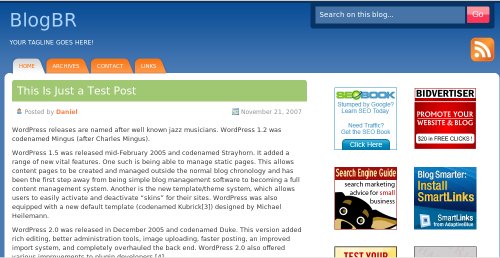
deepblue125x125.jpg

The theme is available in three versions, with the sidebar on the right side, with the sidebar on the left side and with 125×125 ad blocks. Below you will find the download links:

Don't want to miss a single tip? Subscribe to our RSS Feed!

170 Responses to “Deep Blue Wordpress Theme Released”

  1. Vikram Kinkar on November 28th, 2007 3:43 am

    Its a good theme Daniel! Very Clean and minimalist!
    And its great that you gave an option of selecting the option to go for either the right or left sidebar. Thats quite innovative!

  2. Daniel on November 28th, 2007 3:51 am

    I think that the right sidebar looks nicer, but a left one with a adsense unit on top should perform quite well on the monetization aspect.

  3. Dave Davis on November 28th, 2007 4:23 am

    This theme is awesome. VERY adaptable. Been playing around with the CSS and due the the simplistic nature it is very easy to change and make look different. I think something like this should be included by default with WP.

  4. Michael on November 28th, 2007 4:44 am

    That theme looks absolutely awesome. The adsense integration looks neat and tidy, the styling looks polished and web 2.0-esque.

    It sounds crazy, but the dedication you guys put into the community is astounding. I wish that I would someday have the time to contribute like you guys do.

    Great theme, even though I’ll stick to my current one at the moment, I’ll be using it in the near future.

    Thank you so much.
    Michael.

  5. Wayne Liew on November 28th, 2007 5:04 am

    A simple and great theme.

    What I like about it is the white background for the main contents which will open the compatibility of the theme with pictures and widgets of any colors.

    A third column option will be a great add-on to this theme.

  6. Kevin Muldoon on November 28th, 2007 5:35 am

    Very nice theme. Good work :)

  7. bmunch on November 28th, 2007 5:37 am

    Great choice of colors. Especially the red button on the search bar.

    Is it possible to change the adsense integration to 125×125 banner block?

  8. Daniel on November 28th, 2007 5:38 am

    bmunch, I had thought of that, it is coming!

  9. bmunch on November 28th, 2007 6:32 am

    That’s great….

    Wow, that was a fast reply.

  10. bakkouz on November 28th, 2007 6:55 am

    I can’t say its “awesome”, to be quite honest. there are very few WordPress themes that I can call awesome, like K2 and its derivatives, now That, is a truly awesome theme. this theme is nice and all, but its pretty standard, nothing really spectacular about it. and its too minimalistic for my taste.
    Sorry, had to be honest :)

  11. Daniel on November 28th, 2007 7:23 am

    Bakkouz, no worries, it is a matter of taste.

    I really like the design, and will probably even use it on some of my smaller blogs.

    Other people seem to like as well, cause there are quite a few downloads already.

  12. Chris Jacobson on November 28th, 2007 8:10 am

    I like that theme a lot. I may use it for one of my other sites.

  13. bakkouz on November 28th, 2007 9:52 am

    Don’t get me wrong Daniel, I’m not saying it’s not a good theme, it is a very good and practical theme, And I’m pretty sure it would load fast too, which is excellent. You’ve done a great, and much appreciated Job by the community :)

  14. Tejvan Pettinger on November 28th, 2007 2:10 pm

    Looks very good. I may use one of those in the near future.

  15. Dave Starr --- ROI Guy on November 29th, 2007 12:07 am

    very much appreciated. I’ve been using one of Nathan Rice’s other offerings. Elegant Blue for about two minths now and have enjoyed both its looks and performance … this one is certainly a step up … thaks to you, Daniel and Nathan for making such an execellent package available for free.

  16. CaribWebDev on November 29th, 2007 4:12 am

    I like it! Will definitely consider using it on a current or future project…looking forward to future themes

  17. Young on November 30th, 2007 9:03 pm

    there are something wrong when you click the category and archives in the sidebar, the content do not meet it should be, you can see that in your See a Live Demo .

    I would like to know whether you are going to improve that. Tks!

  18. Todd Morris on December 1st, 2007 2:46 am

    I like this theme. I’m currently using one of Nathan Rice’s themes on my site. And before that, one of Cory Millers. One day while surfing, I came across RockinThemes.com … and became hooked on their style. I did vow to myself that I wouldn’t change themes again for at least 6 months. But, I’ll keep this one bookmarked just in case. :)

  19. Daniel on December 1st, 2007 3:13 am

    Young, what is wrong with that? The only thing I see is that you get a header there specifying the category or archive, that is why the content gets shifted down slightly.

  20. Duane on December 1st, 2007 10:15 am

    Being new to Wordpress, I’ve been looking for something simple, clean, and manageable. This is so easy to use even for a newbie such as myself. Many Thanks!

  21. Sharon Hurley Hall on December 1st, 2007 4:18 pm

    Great theme! I’ve just switched my site to it and my readers are loving it!

  22. Nancy Hendrickson on December 2nd, 2007 6:05 pm

    Love the clean lines and color combos. I just installed on a new site and am wondering what do I have to do to remove all of the date functions? This particular site needs to have all posts without any dates. Anyone know how I can do this?

  23. Daniel on December 3rd, 2007 12:34 am

    Nancy, you just need to log into the Wordpress control panel, then Presentation, then Theme editor.

    Once there you will need to open the index.php file and remove the following line:

    <div class=”date”><span><?php the_time(’F j, Y’); ?></span></div>

    After that do the same thing with single.php and archive.php.

  24. Richie on December 3rd, 2007 4:15 am

    That’s a nice theme,thanks!

  25. Youbeatme on December 3rd, 2007 4:47 am

    I like the theme,thanks very much!

  26. Rali on December 3rd, 2007 6:04 am

    It’s just great theme.

  27. skarld on December 4th, 2007 6:51 am

    This series of posts promises to be a big hit, especially with theme releases like DeepBlue.

  28. Jomark on December 4th, 2007 10:15 am

    A really nice professional looking theme. Thanks. I’m using it now on one of my sites.

  29. Bala Krishna on December 4th, 2007 9:49 pm

    Excellent 125*125 column theme.. good to add sponsor links and more content in side bad..

  30. Young on December 5th, 2007 5:06 am

    Danie, I really love the design, so that I have to say that you did not get the point I mentioned. Take the post “Internet Retailer Names DelightfulDeliveries Hot 100 Website” on the demo for example, you can see the defference between http://bpmonaco.com/2007/12/ and http://bpmonaco.com/2007/12/04.....0-website/. The real form can not be shown at http://bpmonaco.com/2007/12/ . That is all, I wont say any more about this.

  31. doniek on December 6th, 2007 6:58 am

    Very nice theme, good job bro :)

  32. Kenneth Elliott on December 7th, 2007 1:08 pm

    I run this theme on a number of my website already and I am very happy with the results. I am glad you gave an option for 125 X 125 Ad blocks. I am going to run this one on my marketassociate.com website.

    Kenneth Elliott

  33. charles on December 9th, 2007 6:43 pm

    wow this theme is clean and pro looking. i will be using this soon. :) thank you for this free wp theme.

  34. milet on December 10th, 2007 7:08 am

    nice template.

    i’m using it now.

    but can you teach me how to change the header. i wanted a different color. maybe light green or light pink ;)

  35. Jasark on December 11th, 2007 4:44 am

    When adding the adsense code into the ad.php I get the following error. Can someone please help?

    Parse error: parse error, unexpected ‘

  36. Daniel on December 11th, 2007 4:54 am

    Jasark, you need to add the code below the lines that are already there. That is, do not remove or change them.

    Let me know if this solves the problem.

  37. Jasark on December 11th, 2007 5:11 am

    Daniel,

    PERFECT!! I was adding the code in between the php tags. It worked! Thank you for the incredibly fast answer!

  38. BestDesi on December 14th, 2007 6:02 am

    Hi,

    I am using your theme in my website. But i am getting this one error which Firebug (in firefox) shows up

    missing ; before

    hover.js (line 1)

    What does the hover.js do? how do i fix that error as it is effecting the thickbox.js which is used by my images.

    thanks.

  39. Nikki on December 14th, 2007 6:13 am

    I love this theme!!! Thank you for creating it, I was searching for a theme like this for about 1 week, and I stumbled upon this by way of google. So here is my problem, I am new to this so excuse my ignorance. But when I click on the rss chicklet it gaves me a page filled with codes, how do I get this to go to my rss feed instead?

    One more question this is what is in the ad.php

    Thanks : )
    Nikki

  40. Nikki on December 14th, 2007 6:15 am

    sorry my message was cut off, can you give a screen shot of exactly where to put the adsense code in ad.php

    Thank you
    Nikki

  41. Daniel on December 15th, 2007 4:36 am

    Nikki, just put the adsense code below the text that is already there.

    The codes you see when you click on the RSS feed are the lines of your raw xml file I suppose. Inside the Wordpress control panel go into “Presentation”, then “current theme options”. Paste your Feedburner URL there and you should fix this.

  42. Daniel on December 15th, 2007 4:38 am

    BestDesi, this is something related to the hover effect of the tabs. The theme was tested on different browsers so I am not sure why the error is there. If you find any visualization problems let me know, but there shouldn’t be any.

  43. Houndico on December 16th, 2007 4:15 am

    Love this theme, and I am now using it myself.

  44. marco on December 17th, 2007 11:34 am

    Very nice theme - clean and straight forward. Excellent Ad placement.

  45. Not John on December 17th, 2007 6:50 pm

    Nice theme, I too would like to see a third column. I am learning how to blog and have been mucking around with wordpress. Each of these wp files seem a little complex to me and I have messed a few up at times. Having people like you that offer up better choices for themes is greatly appreciated.

    Thanks,

    Not John Chow

  46. Chess360 on December 20th, 2007 5:27 am

    Hi, if I re-arrange the widgets from Presentation -> Widgets, the popular articles only show the latest 5 posts regardless of my choice of category as popular. And the resent posts only show 5 posts exactly the same as the popular posts.
    Am I doing anything wrong? Or is it a bug of the theme?

  47. Speedy on December 21st, 2007 8:13 am

    This is a good blog theme, clean and beautiful

  48. Nikki on December 22nd, 2007 4:32 pm

    Thank you I was able to correct it and it now works perfectly.

  49. Ahilosu on December 26th, 2007 3:48 am

    Great looking theme but I’m having a few problems w/ it. If I’m using firefox to open the site, there are no margins to any page elements and the background is blue. If I’m using IE to open it, it appears to be working great, but in IE the second sidebar begins where the first one ends. what am I doing wrong?

  50. Daniel on December 27th, 2007 7:20 am

    Ahilosu, might be problems specific to your PC cause the theme was tested on different browsers and is working fine.

  51. luukmuu on December 28th, 2007 1:40 am

    thank for awesome design
    Merry Christmas and Happy new year ……..God bless you

  52. Ahilosu on December 29th, 2007 1:22 pm

    I have made no modifications to the theme, so being my fault is kinda like out of the question…however, I have re-uploaded the files but the situation is similar.

  53. Ahilosu on December 30th, 2007 4:59 am

    ok, I’ve managed to solve the problem. the theme looks great but is there any possiblity to remove the “popular acrticles” widget?

  54. Lino on December 31st, 2007 6:14 am

    hello,
    First of all thank you for this theme, it is very beautiful.

    i have a question, i want insert a new menu tab, “contac me”.
    How can I do?

    thanks for all.

  55. Daniel on January 1st, 2008 5:18 am

    @Ahilosu, yeah you just need to delete this section from the sidebar.

    @Lino, you need to create another “Page” inside the Wordpress control panel, then this menu tab will be added automatically.

  56. max on January 6th, 2008 7:47 am

    i ve been using this one , and i like it , but i cant seem
    to get the ad unit to work ,
    maybe im getting it wrong ..
    how should the ad.php look like after i put the code?
    should i put all the code ? or just the number id ?

  57. Daniel on January 6th, 2008 8:22 am

    max, are you using the adsense version or the 125×125 blocks one?

  58. max on January 6th, 2008 8:41 am

    im using the adsense version

  59. max on January 6th, 2008 9:54 am

    my doubt is how the ad.php should stay .
    like this?

    or should i put the full code ?
    and remove the
    //
    //
    ?

  60. Daniel on January 6th, 2008 11:18 am

    Max, dont alter the lines that are already just, just add the Adsense code right below them.

  61. max on January 7th, 2008 12:41 am

    i get this error when i put the code just below the lines .
    Parse error: syntax error, unexpected ‘

  62. cindy on January 7th, 2008 3:22 pm

    daniel: I want to add cj 125X125 ads in the given blocks, how do i do that? with their html or javascript code, their image is already there… or where should I host the image for say for other affiliates eg: seo book?

  63. Daniel on January 8th, 2008 12:54 am

    @max, looks like a local problem them, cause pasting the Adsense code below the lines that are already there should work smoothly.

    @cindy, the banner images should be placed on the “ads” folder that you find inside the theme.

    If you are going to use another method (javascript, for instance) you can put that code directly on the ads.php file.

    You might need to rework some of the margins and alignments though.

  64. GP on January 10th, 2008 2:42 pm

    great themes, i will use deep blue with 125 x 125 ads in my new blog, thanks for sharing bro

  65. Billy Dennis on January 11th, 2008 1:51 am

    I love your theme, but I am having a booger of a time trying to figure out where to place the call for a gravatar icon in the comments. I’d like it to be within the body of the comment, but I can’t seem to find the exact location.

  66. Elizabeth on January 11th, 2008 8:34 am

    Check out how awesome your theme looks in action!

    http://momreviews.net

  67. Elizabeth on January 11th, 2008 10:06 am

    Well, except it looks fine in Firefox but not in IE7. The bottom two ad blocks are off-center. Any suggestions?

    Also, I’d like to add a Technorati button at the top next to the RSS feed button. I found the RSS feed section of the stylesheet, would I need to make a similar section for technorati?

  68. neo on January 11th, 2008 11:11 pm

    Very nice theme. This is exactly the layout I have been looking for.

    Neo

  69. Henry on January 14th, 2008 10:02 pm

    How would I change the main title at top left with a graphic? I have no trouble matching the background color, just would like to get my logo there.

  70. Daniel on January 17th, 2008 5:09 am

    @Billy, I think you might need to customize the CSS a bit to insert gravatars.

    @Elizabeth, let me know if you manage to solve the alignment issue. You will also need to play with the CSS a bit to insert the technorati button and put it in the desired location. (my advice: technorati is getting useless).

    @Henry, you will need to open the header.php file and remove the call for the blog title.

    Here is the line you looking for:

    <div class="title"><a href="<?php echo get_settings('home'); ?>" title="<?php bloginfo('name'); ?>"><?php bloginfo('name'); ?></a></div>

    Delete this line:
    <?php bloginfo(’name’); ?>

    And put the call for your logo there.

  71. D.A. on January 17th, 2008 11:06 am

    Daniel,

    I’ve got this theme for my brand new dental blog. I’m trying to figure out exactly how to put 125×125 ads in those boxes, but I don’t understand how.

    Could you give a detailed explanation perhaps for us wordpress dummies trying desperately to learn? :)

  72. Daniel on January 17th, 2008 11:56 am

    D.A., first of all you need to upload the banners via FTP to the ads folder.

    You will find these one on /wp-content/themes/deepblue/images/ads

    After that log into Wordpress control panel, go to “Presentation”, then “Theme Editor”, then open the ads.php file.

    There you will put the name of the banners (e.g., company1.gif) on the lines that are already there, you just need to modify them.

  73. MoneyDummy on January 18th, 2008 8:13 am

    When I install the theme, the home page is blank and the bottom sidebar bears this message: Fatal error: Call to undefined function: wp_list_categories() in /home/.gestalt/moneydummy/moneydummy.net/wp-content/themes/DeepBlue/l_sidebar.php on line 18

    Am I don’t something wrong?

  74. Daniel on January 18th, 2008 9:26 am

    Somehow your WordPress install is not recognizing the php call to the sidebar.

    Eliminate that line on the sidebar.php and make manual links to the categories, this should fix the problem.

  75. MoneyDummy on January 18th, 2008 9:54 am

    Thanks so much for taking the time to reply!

  76. Bong (JB) on January 18th, 2008 10:20 pm

    I was impressive by the new look of a fave blog of mine so I followed the link here. Nice theme. I’m thinking which of my blogs should use it…

    Thanks. :D

  77. Jordi Planas Manzano on January 20th, 2008 3:35 am

    Very nice theme.

    What is the OK size for a logo image?

    Thank you in advance.

  78. Daniel on January 21st, 2008 9:54 am

    Jordi, different sizes could work depending on what you are aiming for. Just play with them.

  79. jawwad on January 23rd, 2008 12:44 pm

    whenever i try to put a comment with a smiley in this theme it appears above the actual text (not aligned with the text on the line)that looks very weird. How I can correct it.

  80. Daniel on January 25th, 2008 2:29 am

    jaywad, I will take a look into the smileys.

  81. Jawwad on January 28th, 2008 2:45 am

    Daniel: I am waiting for your response. Please do help if you have a solution. Because it will be an overwhelming task to opt for a different theme for me now as I have moded it heavily to my needs and just stuck on this smileys issue.

  82. Daniel on January 28th, 2008 4:37 am

    Jawwad, here is the fix, add these lines of code to the stylesheet (style.css) file.

    #content img.wp-smiley {

    float: none;

    border: none;

    padding: 0px;

    margin: 0px;

    }

    #content img.wp-wink {

    float: none;

    border: none;

    padding: 0px;

    margin: 0px;

    }

  83. Jawwad on January 28th, 2008 3:50 pm

    Thanks for the help Daniel.

  84. sheva381142 on January 30th, 2008 7:44 am

    I already uploaded all data in the folder, it works and still has error :

    “Warning: Invalid argument supplied for foreach() in /home/ekuta/public_html/blog/wp-content/themes/new/config.inc.php on line 3″

    What should I Do? Need a bit detailed explanation. I am newbie in wp.

    Thanks in advance.

    Sheva381142

  85. oci on January 30th, 2008 2:25 pm

    Thanks Daniel, you are indeed God sent.
    I am on my way to resurrecting this blog and this theme is the best thing to have happened to it thus far.

    I owe you one, mate.
    Cheers.

  86. Nancy on February 7th, 2008 9:40 pm

    Would someone be willing to share how they set up the 125×125 ad file and the google ad file? I’ve tried but nothing is working - and I think I just don’t have the code in correctly. I would love to see samples of these two files, using fake code - just so somone without a lot of coding ability can figure out the convention used.

    Thanks!

  87. Коолекционер бизнес-идей on February 8th, 2008 12:05 pm

    Nice theme. I’ll recommend it for my friend. Her blog will be about success and this theme matches the success very mach.

  88. Manish on February 10th, 2008 5:43 pm

    I saw that this template uses get_links() and this function has been deprecated. This shud be replaced with wp_list_bookmarks()

  89. Blog Oh Joe on February 17th, 2008 10:57 am

    Would be nice if someone could port this theme to Drupal. ;)

  90. Steve on February 19th, 2008 6:36 pm

    Could not sort the Browse page. Tried to add the archive.php by selecting custom fields and choosing _wp_page_templae but it did not take. Anyone able to do this? Didn’t see Page Template as a choice on the right hand side under Page Parent.

    Anyway, ended up using the Dagon Design sitemap plugin. Worked well.

    Nice theme overall. Thanks for the effort.

    Steve

  91. Motarile on February 27th, 2008 2:26 am

    Hi there,

    I found this theme is fantastic. The only problem is that cannot be internationalized easily. So I’ve modified all your sources to use the _e function for every screen output.

    here you can find the modified sources and the traslation to spanish.

    Thanks for this theme.

    Regards from Barcelona

  92. Joyce on February 27th, 2008 7:29 am

    HI,
    I love this theme and really want to keep it, but can’t seem to get the Adsense code to work.
    I know you said to put it directly under the two sentences that are there, but when I look at the site, there is just a blank spot where the adsense should be.

    Joyce

  93. Joyce on February 27th, 2008 7:31 am

    Ignore previous post, I got it working.

    Joyce

  94. Charles Hamel on February 29th, 2008 12:28 am

    you will need to open the header.php file and remove the call for the blog title.

    Here is the line you looking for:

    ” title=”">

    Delete this line:

    And put the call for your logo there.

    I am CSS ignorant, but follow directions well. How do I add a call for my logo to achieve a graphical header on the Deep Blue Theme with the 125X125 ads version

    Thanks so much in advance

  95. marcelo araujo on March 12th, 2008 1:37 pm

    hi daniel. im testing the nice deepblue theme. i setup in options/reader to make a page “Smile.. you are here” to be the initial page. but the default page “home” is showing the “Smile” content too. i need to “home” continue to show the posts… and the “smile” is the default home-page, when the site is access. what i must do to setup to do it? what file i must change? and what tag i must edit? im not a programmer… thanks a lot. sorry for my english (im from brazil)

  96. Daniel Scocco on March 12th, 2008 2:39 pm

    Marcelo, I don’t think that has anything to do with the theme, these are WordPress settings that you need to solve.

    Try to search on the WordPress forums. Remember the homepage/static page deal is related to your WP version also.

  97. marcelo araujo on March 12th, 2008 2:49 pm

    hi daniel. thanks. im using the newer version of WP (2.3). and i search a lot on the foruns and in the wp codex, but i havent sucess. the page ‘home’ shows the same content of my static page, that i setup in options > read.. and not the posts, how i need…
    thanks.

  98. marcelo araujo on March 15th, 2008 2:25 pm

    hi. the error persists… if anybody can help me… i thanks a lot…
    ” i setup in options/reader to make a page “Welcome” to be the initial page. but the default page “home” is showing the “Welcome” content too. i need to “home” continue to show the posts… in Options dont have the “home” page to setup as the posts page…
    help me please!!!

  99. Marketing en Internet on March 19th, 2008 5:55 pm

    Absolutely great WordPress theme !

  100. David Jacques-Louis on March 21st, 2008 6:14 am

    Very fine one

  101. Paradigmatico on March 21st, 2008 9:17 pm

    This is an excelente theme, I started using it some months ago and I find it terrific.

  102. Ahilosu on March 28th, 2008 10:42 am

    Hello there. I’m using the right sidebared version of deep blue. what would be the way for me to add an extra sidebar on the left side?

  103. HotJoint on April 3rd, 2008 12:40 am

    I have this theme running on my WP 2.5 installation and is just great but i want to know if it takes advantage of the new stuff that came with the new WP.

    If not i will still using it, but, do u guys are planning to create any actualization to make this theme fully compatible with WP 2.5??

    thanx

  104. Sean P. Aune on April 12th, 2008 2:40 pm

    Would there be any way to cut the 125×125 down to just two spots (I already successfully did that) and replace the other 4 with Google Ads? I tried it, but it screwed up the alignment. I am trying this on a new blog, and so it may be quite awhile before I can sell the spots, but I want them in place.

    Anyone have any ideas?

  105. Sean P. Aune on April 13th, 2008 3:03 pm

    Okay, no matter what I do I am getting this problem, I took a screenshot of it and you can see it at http://www.startertech.com/google-problem.gif I have NOT inserted anything into the sidebar such as extra ads. Anytime I put Google AdSense code in to the ads.php, this is what happens. I don’t get it, and it’s annoying the heck out of me. It does however let me keep two of the 125×125 spots with Google Ads below them… so yay for that!

  106. Chris on April 14th, 2008 2:37 pm

    Thanks for another great theme! I featured it on my site, Themes that don’t suck!

    http://www.themesthatdontsuck.com

  107. Tom Colvin on April 15th, 2008 5:19 am

    I’m currently using the Spotlight theme, but like your’s even better as the blog posts are even less cluttered.

    However, in testing your theme with Theme Test Drive, I’m uncovering problems in the sidebar. I would like to move 2-3 of my widgets up into the box that stretches across the entire sidebar — my poll, for example, and a couple other high-feature items on my blog. I haven’t discovered how to move the widgets into that section. In fact, is it even possible to move everything in my sidebar there, rather than splitting into the columns?

    Second question: is it possible to move the 125×125 boxes to the bottom of the sidebar?

    And how did HotJoint get the “envelop” into the header, along with the RSS feed icon?

    Thanks.

    Thanks.

  108. Free Website Content on April 20th, 2008 3:54 am

    Sir how do i download this them. Plz prrovide a download link i wan to use this. plz
    thanks

  109. Krishna on May 4th, 2008 10:30 pm

    Hi Daniel,

    Thanks for the free template. I have started using it with minor tweaking to my blog. May I request your help for the following:
    I want to change the search functionality to be performed by Google Custom Search Engine. Can you please advise me on the changes for enabling so.

    Thanks,
    Krishna

  1. Please Pardon My Appearance
  2. DeepBlue Theme Released! | Nathan Rice
  3. One and Forty Eight SEO Optimized Wordpress Themes. | Blog Gigs
  4. WordPress 主题推荐:Deep Blue Wordpress Theme - 漫步
  5. links for 2007-11-29 | SridhaReena
  6. Temas gratis para WordPress para el 30 de noviembre - Carrero Bitácora de los Hermanos Carrero, David Carrero Fernández-Baillo y Jaime Carrero Fernández-Baillo.
  7. Deep Blue, un elegante tema para WordPress
  8. Stumble into the Weekend 11/30
  9. Best 3-Column WordPress Themes
  10. BrandBrains » links for 2007-12-04
  11. Weblog Tools Collection » Blog Archive » WordPress Theme Releases for 12/5
  12. Wordpress Update RSS » Blog Archive » WordPress Theme Releases for 12/5
  13. BLOG.biz (gear for your WordPress blog) » Deep Blue
  14. Temas gratis para WordPress para el 4 de diciembre - Carrero Bitácora de los Hermanos Carrero, David Carrero Fernández-Baillo y Jaime Carrero Fernández-Baillo.
  15. WordPress Theme Releases for 12/4 - ThemeLogs
  16. Blog Design Flux, New Blog Theme
  17. Wordpress Update RSS » Blog Archive » WordPress Theme Releases for 12/4
  18. Choosing a WordPress Theme
  19. 把主题更换为Deep Blue Theme了
  20. 再次更换主题
  21. PaulAbrams.ca » Blog Archive » 10+1 Tips for Choosing a WordPress Theme
  22. Randy Roedl On Wordpress Blogs
  23. Still not good
  24. 最近の WordPress Theme 12/4 at orioa
  25. Are You Good With Wordpress Themes?
  26. Randy Roedl On Wordpress Blogs
  27. Deep Blue
  28. Sabrina Dent: Pixel Pushing Ireland » Sunday Style 02: Here Comes the Blog
  29. A Pretty Pickle To Be In
  30. Best Three Column Wordpress Themes | scrapur.com
  31. Wordpress themes | Ahilosu - above the rim
  32. 50 Plus Best 3 column Wordpress Themes at Blogger Hacks,Blogger Templates,Tips ,Tricks,WordpressTheme Blogs
  33. Tips for Choosing a WordPress Theme - The Arts Lab TurkeY
  34. Update theme. | New York News Watchers
  35. Technoblue K2 : Again and Again | Tebaboom (dot) Org
  36. Andy Wibbels » WordPress Themes: 2 More Really Cool Ones
  37. Drawing your own Cartoon sex theme at Drawn Sex
  38. Ripped 1.0 Wordpress Theme Released | Tebaboom (dot) Org
  39. Nuevo rediseño de FotoMurcia « Fotomurcia
  40. Стилни теми за Worpdress - 21.02 « Блог за WordPress
  41. Deep Blue en castellano
  42. Be-mine.ws Web-Blog » Gallery Theme 3 cột tốt nhất cho WordPress
  43. 选择WordPress主题的11条技巧 - 总而言之,统而言之
  44. MyEss.cn - 选择WordPress主题的11条技巧
  45. MSDN Blog Postings » How To Choose an Effective Blog Template or Theme
  46. AustinBlogger » Blog Archive » links for 2008-03-22
  47. HDtv film Thailand » Archive » My del.icio.us bookmarks for March 21st through March 22nd
  48. SoCo Buzz - South Congress Austin Texas » Blog Archive » My del.icio.us bookmarks for March 21st through March 22nd
  49. Joe Grady Tuck Blog - Bastrop, Texas Attorney talks law and land » My del.icio.us bookmarks for March 21st through March 22nd
  50. wholetech blog | My del.icio.us bookmarks for March 21st through March 22nd
  51. My del.icio.us bookmarks for March 21st through March 22nd
  52. GameSlides » Blog Archive » My del.icio.us bookmarks for March 21st through March 22nd
  53. 乱七八糟 | 谷米虫
  54. Translate DeepBlue to your own language
  55. Four Favorite WordPress Theme Designers | PureBlogging
  56. Wordpress Themes Thursday! | Thatblogsite dot Com
  57. free proxy template free proxy guide
  58. 乱七八糟 | 谷米虫
  59. Deep Blue Theme在IE6下评论偏移的BUG修复 - 施炜煜的Blog_来自山苏村
  60. 50 Best Free WordPress Themes Gallery
  61. OT: Migration to a Deep Blue template

Got something to say?


Sponsors

Online Invoicing For Freelancers Why I recommend Doreo Hosting More Traffic for Your Blog Premium WordPress Themes Free WordPress Themes Yougler Plugin - Reliable Contact Form

Popular Articles

Recent Articles

Subscribe via E-Mail


Trying to Find a Good Domain?

killerdomainsbook1.jpg