Homepage Excerpts Wordpress Plugin

I am glad to finally release Homepage Excerpts, a Wordpress plugin that I have been developing with a friend for some time already. The plugin has two main objectives. The first one is to make blogs that use full posts on the homepage more search engine friendly. The second one is to give flexibility to people that want to use both full posts and excerpts on the homepage.

Homepage Excerpts for SEO

We are all aware that Google and other search engines penalize websites that contain duplicate content. Ideally, therefore, the content of your posts should be displayed fully in one location only, and that is the single post page.

Most blogs, however, display full posts on the homepage as well, and the posts remain being displayed in full even when they slip out of the homepage into page two, three and so on.

The Homepage Excerpts plugin can be used to reduce this duplicate content while keeping full posts on the homepage. Suppose you have 8 full posts on the homepage. Once you activate the plugin you will have the option to select how many posts to display fully in the homepage. The options will go from 1 up to 8. If you select 8, all your posts on the homepage will keep being displayed fully while all the other posts (the ones on page two, three, four and so on) will turn into excerpts.
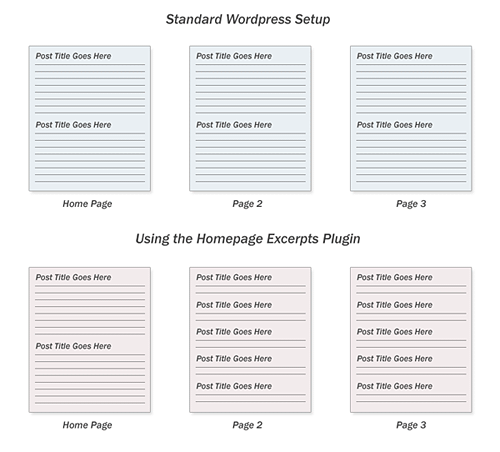
homepageexcerptsexample.gif

Remember that new pages usually take one week or more to get indexed by search engines, so that by the time your single post page gets indexed the post will already be out of the homepage, and it will be displayed as an excerpt, removing the duplicate content issue.

Apart from SEO benefits this change might also improve the user experience. Displaying only post excerpts on the subsequent pages will make it easier for readers to scan them quickly while searching for the post that they are looking for.

Homepage Excerpts for Layout

The plugin can also be used if you want to use an hybrid layout on your homepage, displaying the most recent posts in full and the older ones with an excerpt. On this blog usually I display the most recent post in full while making the others show excerpts, so that the reader can scan quickly through all of them. Some other people might want to display half of the posts on the homepage fully and the other half with excerpts. With the plugin you have complete control over this.
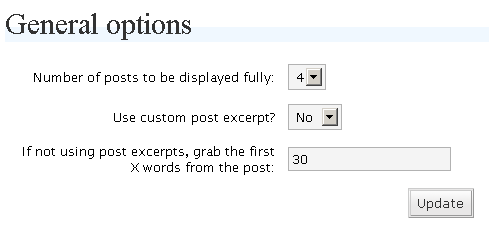
homepageexcerpts.gif

Notice that you can also select if the plugin should extract the custom excerpt from Wordpress (the one that you insert manually when writing an entry) or if it should automatically grab the first X words of each post, where X is a number that can be specified on the options panel.

Installation

  1. Download and unzip the plugin
  2. Uploade the file homepage-excerpts.php to your plugin directory. (Usually
    located in wp-content/plugins/)
  3. Log into the Wordpress control panel, then go into “Plugins” and activate the
    plugin
  4. Still inside the Wordpress control panel go into “options” and then “Homepage Excerpts”
  5. Update the plugin options as appropriate

You can receive our articles for free on your email inbox, with more web design, SEO, monetization and blog tips. Just enter your email below:

319 Responses to “Homepage Excerpts Wordpress Plugin”

  1. Shankar Ganesh on September 5th, 2007 6:37 am

    Wow this is just great for SEO. I think I’ll install it immediately

  2. Daniel on September 5th, 2007 6:41 am

    If you have any problems using it or suggestions for upgrades let me know.

  3. Ashish Mohta on September 5th, 2007 6:54 am

    Daniel, I have a different view. Putting a full page in home page and then same post as single post is duplication by itself.

    why not just use the_excerpt in the wordpress loop instead of the_content. This will just display exceprts.

    Home page gets indexed faster and this will create duplicate content when its time your single page gets indexed. I think its better to use exceprts everywhere. The first 30 lines are more than enough to which is showed in exceprts to get it into serach engines

    Moreover i had seen posts getting indexed in a day or 2 now. Even matt cluts said about it that google indexing had gone faster now.

  4. Daniel on September 5th, 2007 7:25 am

    Ashish, there is a percentage of readers that don’t like post excerpts in the Homepage, that is why the majority of blogs (including big ones like TechCrunch) still use full posts on the Homepage.

    Bloggers that want to keep full posts on the homepage, therefore, can use the plugin to minimize the duplicate content issue.

    Also, even if the post gets indexed in two days, it will remain duplicate only for as long as it stays on the homepage, once it goes to page 2 that gets fixed.

  5. Romance on September 5th, 2007 8:11 am

    Hey cool plugin man, I just installed it. Great job.

  6. Wallace on September 5th, 2007 8:23 am

    innovative plugin, great job!

  7. Eric Grey on September 5th, 2007 8:25 am

    I definitely appreciate this. My readers are pretty into full posts on the homepage - but I’ve been worried about SEO troubles. I think this plugin helps me maintain a healthy balance. Thanks a lot!

    Eric Grey
    BMM member

  8. Nicolargo on September 5th, 2007 8:45 am

    For a french version, you can have a look here

  9. Contest Blogger on September 5th, 2007 9:36 am

    There have been some complaints that the French version of this plugin surrenders whenever you attempt to install it, so be careful.

  10. Daniel on September 5th, 2007 10:05 am

    Nico, I will ask you to not offer the download of the plugin directly from your blog. I welcome anyone writing about it, but please just put a link to this page.

    Sorry about this, but it is the only way I have to control how many people are downloading it and to keep the code intact.

  11. Steven Bradley on September 5th, 2007 10:28 am

    Daniel I’ve always manually set things up so my most recent posts shows in full and then after that it’s the excerpt on the home page. I add the -more- comment.

    I think I’ll like you’re plugin better as a solution since the manual approach means going back into each post and adding the comment after publishing the next post.

  12. engtech @ internet duct tape on September 5th, 2007 11:59 am

    It looks worth leaving WordPress.com for.

    I have to achieve something similar in a very hacky way by using CSS display:none; for all the posts except for the first post, and then getting rid of the navigation options off of the first page.

  13. Robert Irizarry on September 5th, 2007 12:03 pm

    Great idea! I’ve been concerned about duplicate content but I’ve been reluctant to move to partial posts on my main page. This definitely opens up some opportunities.

  14. Michel Fortin on September 5th, 2007 12:24 pm

    Great plugin! My only problem with it is that it doesn’t display a link at the end of the full post to comment or at least to view them. In fact, the full post cuts abruptly at the end of the article, and that’s it. I would be nice to be able to add a link at the end to comment and customize that text from within the plugin’s CP.

  15. Daniel on September 5th, 2007 2:44 pm

    Michel, I think what the links you are talking about (or the lack of them) are coming directly from your theme.

    The plugin will display whatever links your theme has specified with full posts and excerpts.

    Let me know if you are referring to something else.

  16. Steven on September 5th, 2007 3:18 pm

    Daniel,
    Congratulations on the first plugin! I think it will be helpful for thousands of WordPress users, and hopefully it will give you a lot of backlinks too.

  17. Daniel on September 5th, 2007 3:43 pm

    Thanks Steven, 250 downloads so far. The plugin was born out of a problem I had, so it is good if other people will benefit from it as well.

  18. Brip Blap on September 5th, 2007 4:38 pm

    Fantastic plugin - worked perfectly!

  19. Everton on September 5th, 2007 4:49 pm

    I’m with Ashish on this Daniel. Homepages get very little traffic, so it’s better to go with a simple solution like just displaying excerpts. It’s what you do with your category pages, so why all the hassle on the homepage?

    Also, displaying full posts on could actually be bad for SEO! Some robots only index a limited amount of words, then displaying full posts will mean that some of your content won’t get picked up!

  20. Daniel on September 5th, 2007 4:55 pm

    Everton, I agree with you and Ashish. However, many bloggers prefer to have full posts on their homepage regardless of any SEO problems, since most of their readers like it that way (and you cant argue with the fact that a blog should be built for the readers and not for the search bots).

    That is where the plugin comes into play, it help these bloggers limit the diplicate content issues while STILL displaying full posts.

  21. Photoshopium on September 5th, 2007 6:41 pm

    Wow, very sweet plugin! Thanks a lot. It really helps.

  22. Jason Ho on September 5th, 2007 8:41 pm

    nice one..this is going to be useful for me.. :)

  23. Angela on September 5th, 2007 9:59 pm

    I have been searching around for a good plugin for exerpts and what a coincidence that your’s is out at just the right time. Thank you Daniel!

  24. dt on September 5th, 2007 10:16 pm

    Hi Daniel,

    Great plugin. I had this same idea but instead got it manually hard coded into my blog http://www.designsojourn.com. I can control via php calls the number of full posts and the remaining older posts as just titles below.

    However my question is what about RSS feeds? Will the conversion into excerpts affect the RSS feed as well?

    I originally had all my posts as excerpts, but at the request of my RSS readers I removed the excerpts and run full posts on the front page. But I am now a victim of copyright thief and am thinking of switching back.

    Anyways, I disagree with Everton, my home page is my entry point, and having excerpts means one more click away for my readers.

    Thanks again I will use it on my others blogs.

  25. Lincoln on September 5th, 2007 11:01 pm

    Works great! A couple of suggestions: you might want to give users the option of trailing excerpts with a [...] so it doesn’t end so abruptly, and maybe place a line break before the “Continue Reading” link for a cleaner look. :-)

  26. dt on September 5th, 2007 11:33 pm

    Hi Daniel,

    I’ve got it up at my blog http://www.designsojourn.com but there is a bug the “Use custom post excerpt?” is not picking up the “more” tag. Not sure if its me or the plugin, but do check it out.

    thanks!

  27. Daniel on September 5th, 2007 11:34 pm

    dt, the custom excerpt option is supposed to pick the text that you enter on the “Optional Excerpt” field when writing a post on WP, and not the more tag.

  28. Daniel on September 6th, 2007 12:58 am

    Thanks for the input everyone, I am working on putting a trailing […] at the end of the excerpts so that it you will look nicer.

    Regarding the space between the excerpt and the “Read more…” link, I think you can customize it manually via CSS.

  29. Shankar Ganesh on September 6th, 2007 3:44 am

    @Daniel: The plugin works like a charm. I had no problems using it.

  30. Robert Irizarry on September 6th, 2007 6:19 am

    Great plugin! - I installed and activated it yesterday. My site gets a fair amount of traffic to the front page so I’ve always displayed full posts there. It’s great to have a way to address SEO concerns on subsequent pages. Thank you!

  31. Technobuzz.net on September 6th, 2007 7:48 am

    Nice plugin

    downloading it

  32. Greg Balanko-Dickson on September 6th, 2007 9:13 am

    Thanks for the great plugin and to Michael Marine to pointing to you.

  33. dt on September 6th, 2007 5:25 pm

    Thanks Daniel, I will look it up more at the wordpress site.

  34. ppgc on September 7th, 2007 12:25 am

    sorry but this plug dont take care about the “more” field in my posts, i want to show 4 full post ok, but i want them full until it come the “more” tag. i dont want them completly full. any solution?

    sorry for my english, hope you see what i mean. thx

  35. Daniel on September 7th, 2007 3:43 am

    ppgc, currently the plugin is not compatible with the more tag, you either show posts in full or you show them in excerpt. But you can select how many words the plugin should pick from the post to put in the excerpt.

  36. Daniel on September 7th, 2007 3:44 am

    The plugin has been updated so it does not cut excerpts abruptly, now it adds a [...] after the excerpts.

  37. Joey on September 7th, 2007 6:39 am

    I am going to try this plugin. I tried a different plug in some months ago but it did not work properly. Thanks.

  38. Randa Clay on September 9th, 2007 5:35 am

    Awesome - thank you so much. I will definitely be using this.

  39. Peter Flaschner on September 10th, 2007 1:05 pm

    Nice one Daniel! A great idea.

  40. Shiva on September 11th, 2007 1:37 am

    Wow, just what i have been looking for!!!

    finally.

  41. Mosey on September 11th, 2007 2:54 am

    Cool idea for a plugin! :D I have to admit I chop/change between full and excerpted posts on the homepage, depending on the content that it’s going to display (I have a 2-column that squishes images, so for the sake of aesthetics, it’s best to include that after ‘more’ tab) I have no idea if my visitors prefer full or excerpted posts though - is there an easy/straightforward way of finding this out short of doing a survey?
    Thanks :D

  42. Daniel on September 11th, 2007 4:15 am

    Check the discussion we had here for some insights: http://www.dailyblogtips.com/p.....-homepage/

  43. Paul on September 11th, 2007 12:14 pm

    Looks and works great, except…

    a number of my posts are very short, less than the number of words used for the excerpt, followed by a youtube embed. The plugin seems to ignore the video, so it shows what it thinks is the entire post with no [Continue Reading...], but doesn’t have the embedded video shown. It is still there if you open the post.

  44. BJohnM on September 12th, 2007 8:12 am

    Great plugin idea, and it works perfectly. However, I want to raise the same concern that PPGC raised above about the compatibility with the “more” tag.

    I want to leave the first several articles fully exposed (as your plugin is designed for), but once in a while, I get long winded, and while I may want more than the excerpt displayed when the article in initially posted, I might want to break it further down.

    But, I do understand your logic.

  45. Daniel on September 12th, 2007 11:16 am

    I will try to upgrade it with compatibility with the more tag. Thanks for the input guys.

  46. Lynn on September 14th, 2007 1:35 pm

    Excellent plugin. I am using it on my arts blog now, to keep more posts (excerpted) on the home page for users arriving via SE expecting to see outdated but indexed content. Goodbye “more” tag. I can’t wait to look at site traffic now, to see if search terms get folks to what they seek on home page (perhaps fewer 0 zero seconds visits?).
    Thanks!

  47. Jim Symcox on September 16th, 2007 4:31 am

    Hi Daniel,

    Love the plugin.

    The only problem I’ve found is that I don’t seem to have a menu item for it under Options. I only need the menu because I want to show 2 posts in full on the home page.

    Thanks

    Jim

  48. Jim Symcox on September 16th, 2007 4:45 am

    Hi Daniel,

    False alarm I’ve found the menu item it’s under Options/Reading

    Thanks

    Jim

  49. Kyle @ Rather-Be-Shopping on September 19th, 2007 3:17 pm

    Great Plugin - Nice job, works Perfect!

  50. V.K. Rajagopalan on September 21st, 2007 10:27 am

    Hi Daniel,

    Excellent plugin!

    I have been looking for this sort of a plugin for quite some time now as I was not in favour of changing the theme code to achieve this.

    I have a few suggestions, though:

    1. In the Options -> Number of posts to be displayed fully, could you please have the option from 0 to 10 so that we can have the option to have all posts as excerpts. I would actually prefer to have all posts as excerpts on the home page.

    2. I would prefer if you could extend this excerpts facility to Category, Archives and Search Pages also. Because, duplicate content can occur in these pages also.

    Thanks
    Regards
    Raj

  51. V.K. Rajagopalan on September 21st, 2007 10:31 am

    Hi Daniel,

    This is in continuation of my earlier comment about having the same facility for other pages like Archive, Search and Category pages.

    The purpose of my suggestion is that if we can show the custom excerpts on these pages too, then the question of duplicate content will never arise.

    Thanks
    Regards
    Raj

  52. Daniel on September 22nd, 2007 2:15 am

    V.K., regarding your point 1, the number of posts that the plugin shows is related to how many you display in the homepage.

    If you currently have 5 posts in the homepage it will ask “how many to display fully, from 1 to 5?”

    If you have 10, it will ask from 1 to 10 and so on.

    I will keep in mind the second suggestion, could be a good one indeed.

  53. David Potter on September 25th, 2007 8:44 am

    Very nice plugin. I find that I’m writing rather long posts. Your plugin is handy because it automatically excerpts the posts. A couple things I’ve noticed, however:

    - I’m lamenting the loss of the formatting in my posts on the homepage with this plugin. Unfortunately it may be enough for me to turn it off and manage it manually. I played around with the PHP a little bit but anything other than what you’re doing (stripping tags) would likely be too onerous for a filter. If you can think of a way to preserve formatting, I’d be all over that.

    - The admin page should be titled “Homepage excerpts options” instead of “General options” (minor nit).

    Thanks again for the plugin, though.
    David

  54. David Potter on September 25th, 2007 8:47 am

    Oops. The admin page should be titled “Homepage Excerpts Options”, not “Homepage excerpts options”, to remain consistent with other options pages.

  55. Daniel on September 26th, 2007 10:32 am

    Thanks David, I will keep that on the to-do list for next versions.

  56. David Airey on September 30th, 2007 1:07 pm

    Great plugin, Daniel.

    One thing I’ve found isn’t being applied to my homepage, is the length of excerpt. I want to show a little more text than at present, but updating the 30 words to 50 or 60 doesn’t seem to have an effect.

    Have you come across something similar?

    Off-topic, I’m publishing my prize draw winners in a couple of hours. Thanks again for the kind donation.

  57. David Airey on September 30th, 2007 1:16 pm

    It’s sorted now. Sorry about that buddy.

  58. Esbjorn on October 20th, 2007 4:43 pm

    This plugin ROCKS! This was exactly what I was looking for. I just wish there was an option to make an excerpt of the latest article as well, but a bigger excerpt. So, in the case your latest article is quite long, you could split it up.

  59. Brett McKay on October 25th, 2007 4:51 pm

    Any way to keep the images in the excerpt?

  60. Barbara on October 25th, 2007 9:09 pm

    Hi Daniel,

    I’ve been on your site most of the day, reading your valuable posts. I have been researching robots.txt and duplicate content, and you have covered both subjects very well.

    I downloaded your Homepage Excerpts WP plugin, and it’s working perfectly. That was one thing I had been looking for, and luckily I landed on your site, and took the time to read some of your older posts.

    Thank you for the great plugin, and for sharing your knowledge with the rest of us. It’s most appreciated.

  61. Daniel on October 26th, 2007 2:00 pm

    Brett, there is no support for images yet. I will try to work this out on future updates.

  62. Timoni Grone on November 4th, 2007 2:59 pm

    This is a fantastic plugin! I’m using it on a non-profit blog I helped put together. My only concern is that a lot of the posts have images that I’d like displayed on the homepage, but the plugin seems to be set up so that the images aren’t displayed no matter how many words are in the excerpt. Is there any way to tweak this? I noticed a similar comment earlier (about YouTube videos) but didn’t see a reply.

  63. The Investor's Journal on November 6th, 2007 11:49 pm

    Thank you very much for this plugin. I had been trying for the past week to figure out how to have my first post on my blog page show up in full while the rest were shown as excerpts and your plugin solved that problem perfectly! Once again, I am extremely grateful. Keep up the excellent work.

  64. scart on November 8th, 2007 1:16 am

    is there any way that I can use tag on the first post?

    by the way, this plugin is great I’ve been looking for this for almost a month now.

  65. Thomas on November 11th, 2007 2:28 am

    Hi, great plugin but there are 2 things: the “more” tag is disabled (is it possible to re-enable it trough the plugin editor?), and it would be nice to add a resized image alongside of the excerpt.
    Thanx

  66. casino spielen on November 15th, 2007 7:17 am

    Wenn Sie Lust auf Casino spielen verspüren, dann kommen Sie einfach bei unserem neuen Casino Portal vorbei und lesen Sie unsere Testberichte.
    casino spielen - http://www.punenet.com/

  67. Dan Grahn on November 19th, 2007 11:30 am

    If you want to have all the posts on your homepage display as excerpts change the code that says

    for ($i=1;$i

  68. Audrius on November 22nd, 2007 6:57 am

    Hey, this is really great plugin. I remember those mistakes of mine when even PDF print versions of articles allowed to be indexed… :)

  69. Photoshop tutorials on November 22nd, 2007 10:42 am

    I like it and I am gonna try this.

  70. Desty on December 1st, 2007 2:16 pm

    How do you turn all the posts on the home page to show only excepts? I write long articles and would like to keep my home page brief.

  71. Aneesh on December 3rd, 2007 5:04 am

    This is a nice wordpress plugin..Will soon try it out on my college’s wordpress blog..

  72. Dan Grahn on December 3rd, 2007 1:32 pm

    change the line of code that says “for ($i=1;$i

  73. Jorge Otero on December 3rd, 2007 5:54 pm

    Great plugin! Now, if only it would allow option for images and the “more” tag, it would be perfect. Any chance of an updated version coming any time soon?

  74. Jacob Cass on December 10th, 2007 10:34 pm

    Thanks :)

  75. marcel on December 11th, 2007 12:43 am

    It doesnt work for me, it only works on the first old 2 Posts of my intire blog, the rest stay full posts…no idea why…

  76. Bitten on December 11th, 2007 7:29 am

    Hey, I’m not sure but it seems that this plugin makes my feeds partial feeds. In WP settings I’ve chosen that full text is shown in my feed but they are still partial texts.

    Is there a way to configure this plugin so that full text would be shown in the feed rather than partial text?

  77. Vladimir on December 11th, 2007 1:45 pm

    Great plugin idea! Thanks

  78. Joe on December 11th, 2007 6:21 pm

    Daniel,

    Outstanding plugin!

    One question…

    Is there any way to allow the excerpt to include a post’s opening pic?

    For example, if a post began with a left-justified 150 X 150 photo, is there any way for the photo to be included in the excerpt?

    Thanks

  79. Daniel on December 13th, 2007 1:27 pm

    Joe, yeah, you need to set the options of the plugin to use the custom WP excerpt (the one you can insert below the text editor), then just add the picture code there.

  80. Max on December 19th, 2007 5:38 am

    Thanks a lot for the great plugin.

    Is it possible to make set number of posts to display fully to “0″. So all posts in the front page will be post as excerpt.

  81. Dan Grahn on December 19th, 2007 6:04 am

    Yeah, you just need to change the code so that the minimum number of posts displayed fully is 0

  82. Daniel on January 1st, 2008 2:43 pm

    I will try to update it with “0″ as an option.

    You can also tweak your WP theme files to achieve that easily though.

  83. Dan Grahn on January 3rd, 2008 4:21 pm

    If you want me to, I can send you a file that has 0 as an option.

  84. Daniel on January 7th, 2008 1:29 pm

    Please do Dan, else this will sit on my to-do list for a couple of weeks…

  85. Daniel on January 9th, 2008 2:44 am

    OK thanks to Dan the plugin is now updated and you can select 0 as an option.

  86. Not a Niche on January 11th, 2008 7:15 pm

    Hey Daniel,

    great plugin, any chance to fix this problem Paul (43) told you. When you have a very short text and after that a video, it’s not showing the link.

    Thanks

    Alex

  87. Matt Dawson on January 11th, 2008 7:44 pm

    Thanks for the plugin! This, and an improved robots.txt file, seems to be helping improve Google’s indexing of my site.

  88. Dan on January 12th, 2008 10:34 am

    I like the plugin, but I’m not certain about how it works when I set it to use the first X words instead of a custom excerpt. It seems to strip all the formatting from the text, so that links in the excerpt are no longer links, and so forth. Is there a way to set it do an excerpt based on the number of words but have it keep the formatting in the excerpt?

  89. planningqueen on January 19th, 2008 12:37 am

    Just wanted to say thanks for sharing. I am a complete novice and Wordpress (and bloggin for that matter) and this was exactly what I wanted. Evne better it was easy enough for me to actually activate. Cheers Daniel.

  90. Daniel on January 19th, 2008 1:30 am

    If you want to keep your text formating and any html, images and videos, you will need to use the custom excerpt option, and include the part of the post that you want to appear on the homepage on the “Optinal Excerpt” field that you have below the WP text editor.

  91. Glen Allsopp on January 23rd, 2008 3:54 am

    I’m using this in the latest wordpress and it doesn’t appear to be doing anything…

  92. Daniel on January 23rd, 2008 4:17 pm

    Glen, I tested it until version 2.1.3 and it was working.

    Not sure if 2.3 introduced anything that could clash with the plugin, but I doubt.

    Did you set all the options?

  93. Glen Allsopp on January 24th, 2008 2:35 am

    Yeah I set all the options

    So install, activate, set options and save

    And doesn’t show any full-posts

  94. Dan on January 25th, 2008 11:43 am

    In #85, you said that “the plugin is now updated and you can select 0 as an option.”

    I downloaded using the link in the post and it still doesn’t give me 0 as an option–only 1-10. Did I miss something somewhere?

  95. Niezzam on January 30th, 2008 1:11 am

    Great work Daniel! Thanks!

  96. Zachary on January 31st, 2008 7:32 am

    Homepage Excerpts is a great plugin. Unfortunately it breaks password protected posts in the BlixKrieg theme. I posted my first password protected post today and found the problem. I am using version 1.0 of Homepage Excerpts. I had to disable the plugin, but look forward to re-installing when the problem is fixed.

    Thanks for the great work,
    Zack

  97. Dan on February 6th, 2008 2:01 pm

    Wanted to let you know that Homepage Excerpts conflicts with the Amazon Machine Tags Plugin (which allows bloggers to include cover image, title, and link to Amazon products). Apparently, both plugins add a filter to the_content, and Homepage Excerpts prevents Amazon Machine Tags from working on the home page.

  98. Daniel on February 20th, 2008 2:52 am

    @Dan, it should have the 0 option there already, I will double check in any case.

    Finally, yeah there might be conflicts with other plugins, but it should be a rare case.

  99. Jason Slater on February 22nd, 2008 7:35 am

    Hello, I’ve just read your post and installed your useful plug-in on my Blog. I’ve heard about the search engine penalization for duplicate content but I’ve not seen it written about so thanks for the info.

    Jas
    Jason Slater Weblog
    http://www.jasonslater.co.uk

  100. Genghis Khent on February 24th, 2008 1:08 pm

    Does anyone know if this plug in works with the Pop Blue theme (http://www.blogohblog.com/wordpress-theme-pop-blue/)? It doesn’t seem to on my site.

  101. Prashant on February 25th, 2008 10:51 pm

    Though i really did not think much in terms of the SEO part, coz i why would SE peanilize me as both the pages are on my website and i am sure now SE’s recognize which is a blog and which is not. Never the less, this is a very good plugin from the readers point of view. Thanks

  102. southafrikanse on March 8th, 2008 6:26 am

    @Paul on September 11th, 2007 12:14 pm

    I get the same problem. Perhaps in a next update of the plugin this would be resolved?

  103. moserw on March 8th, 2008 9:36 am

    Awesome plugin man. Just what the doctor ordered. Thanks a lot and continue developing such useful plugins. Appreciate it.

  104. Locos on March 9th, 2008 4:32 am

    It’s works!!

  105. Jan on March 10th, 2008 1:50 am

    Nice plugin, I will use it on my blog. Thanks

  106. Alex on March 11th, 2008 1:39 pm

    Hey Daniel,

    as Dan said in comment #94, there is still no option to select 0.

    For everybody else, switch

    for ($i=1;$i

    to

    for ($i=0;$i

    Alex

  107. Ideal on March 12th, 2008 4:15 am

    Thanks for the plugin. I was really looking it for my shopping blog!
    Thanks a lot!

  108. Daniel Scocco on March 16th, 2008 4:23 am

    Thanks Alex.

  109. Alex on March 17th, 2008 4:54 pm

    @ Daniel Scocco, my pleasure :)

  110. Vikrant on March 26th, 2008 12:30 pm

    Saying that search engines take a week to index the content is absolutely wrong. As far as Google’s indexing of blogs is concerned, it is as fast as 2 minutes from the time of publishing

  111. Gert Leroy on March 29th, 2008 10:31 am

    hi, take a look at the homepage of my blog:
    http://www.emigrant.be/blog/

    starting from the second post i want to show the excerpts, but the excerpts still include my flash-movies.. is there a way to get rid of the movies in the excepts?

    thanks

  112. Daniel Scocco on March 30th, 2008 4:55 am

    @Vikrant, it depends on dozens of site-specific parameters. TechCrunch or the NY Times might get indexed after 2 minutes. I doubt that a small blog will, though.

    @Gert Leroy, use the option to use the WP optional excerpt, and then for each post you paste just the text you want below the text editor on the “Optinal Excerpt” area.

  113. Gert Leroy on March 30th, 2008 9:22 am

    hello Daniel, even when i use the option to use the WP optional excerpt, the posts still show the movies. i use mediacaster to embed my flash movies into wordpress.
    http://www.semiologic.com/soft.....diacaster/
    is there a conflict with the mediacaster plugin and yours?

    another thing i have noticed:
    for embedding youtube videos into wordpress you can use the Youtube Brackets plugin. if you do so, the video will be shown as well in the excerpts using your plugin. However, if you use the WPvideo plugin, the videos don’t get shown.

    Is there any way to fix this? thanx

  114. Daniel Scocco on March 30th, 2008 12:34 pm

    If you use the WP optional excerpt and put some text there, only that text you inserted will be showed in the pages.

  115. Gert Leroy on March 31st, 2008 7:30 am

    hello Daniel, that is true for the Youtube videos. It is not true for the mediacaster videos. I have added an optional excerpt for my last 3 posts and still the videos get shown

    settings:
    Number of posts to be displayed fully: 1
    Use custom post excerpt? Yes
    If not using post excerpts, grab the first X words from the post: 25

    see: http://www.emigrant.be/blog/

  116. Dan on April 3rd, 2008 10:45 am

    Hey Daniel. Neat plugin. I was wondering thought what’s to be changed if lets say i want to display only excerpts on my home page and not even a single full post.

  117. Dan on April 3rd, 2008 10:48 am

    Oh, i figured it out myself. I had to change $i=1 to $=0 on line 59.

  118. Daniel Scocco on April 5th, 2008 11:07 am

    Correct Dan, this should have been implemented on the plugin by now. Somehow it is now, I will check it out.

  119. Gert Leroy on April 5th, 2008 2:05 pm

    hello Daniel,
    is there any news yet about the use of the mediacaster plugin together with yours? i can’t get the movies out of the excerpts..

    thanks

  120. Daniel Scocco on April 6th, 2008 8:57 am

    Gert, that is something that we can’t fix right now. It would involve checking what is the part of the plugins that is clashing and fixing it (i.e. a lot of time).

    Sorry about that.

    I just fixed the option to have all posts as excerpts though, so just download this new version if your old version still had a limit of 1.

  121. 辽宁SEO on April 7th, 2008 5:59 am

    新装的wordpress 2.51,不知好不好用啊。先下载个试试。

  122. Dan on April 17th, 2008 11:43 am

    Anyway this could also excerpts posts on archives/categories page?

  123. Daniel Scocco on April 21st, 2008 1:38 pm

    Dan, not right now. This would be more complicated to do from a single plugin though.

  124. cat on April 22nd, 2008 6:11 am

    Note: in WP version 2.5

    # Still inside the Wordpress control panel go into “options” and then “Homepage Excerpts”

    should be

    # Still inside the Wordpress control panel go into “settings” and then “Homepage Excerpts”

  125. cat on April 22nd, 2008 7:43 am

    Great plugin. Thank you very much for taking the time to create and share it with the WP community. The time to create is one thing. I’m sure the time to answer everyone is just as time consuming, so double thanks.

    ps: I’ll add my vote on showing images …

  126. Gert Leroy on April 27th, 2008 5:41 pm

    OK Daniel, since the clash with the mediacaster plugin can’t be fixed (for now) i would like to show the first post fully and the rest only the title and the footer. So no excerpt at all. That would be a way to work around the fact that my videos get shown. Is there any way to do that?
    thanks
    Gert

  127. 平板 on April 30th, 2008 6:43 am

    good!

  128. webhosting on May 3rd, 2008 7:11 pm

    what are the main advantages of a wordpress blog instead of nucleus or drupal?

  129. DarK on May 20th, 2008 11:01 am

    Teşekkür ederim bu güzel eklenti için, blogun seo suna katkı da bulunacak ;) … (Tükrçe - Turkish)

    Thank you very much this plugin… (English)

  130. Daniel Scocco on June 10th, 2008 12:50 pm

    @Gert, yes, but you would need to tweak some PHP code.

  131. Webhosting guide on June 12th, 2008 3:53 pm

    awesome SEO plugin.

    But in a few months every wordpress blog uses this and other plugins sow they will become useless i think…

  132. SEO Genius on June 17th, 2008 7:02 am

    Grea plug in definitely it will be useful when it comes to me putting a blog on wordpress which will hopefully be soon, still contemplating whethers its worth starting another site yet.

  133. Filipino Blogs on June 17th, 2008 9:42 pm

    I have 7 article per page, i don’t get it, i tried 1 article to be displayed fully but still showing the article as excerpt.

  134. Filipino Blogs on June 17th, 2008 9:46 pm

    forgot my site is eligio.org, i’m using wordpress 2.5 version.

  135. Sherwin on July 1st, 2008 10:57 pm

    @123: Another vote to extend to archives/category pages. Great plugin nonetheless! TIA

  136. Spanish SEO on July 6th, 2008 1:07 am

    Hi there,

    Thanks for the plugin. I installed it without any problems, but for odd reasons it does not show the first post full. They are all excerpts.

    Also, in line 59 how can I use the title post as anchor text instead of “continue reading”.

    Your help is much appreciated.

  137. Sid on July 10th, 2008 4:59 am

    Hi Daniel,

    I am a noobie in bloggin thingy just downloaded the plugin andit works like a charm bt i had set the nor words to take as 60 as i had edited the php script… now the prob is its cutting short half way of the sentence and it makes no sense of it .. Please tell me how do i add excerpts tag in ma posts so tht i can select tht onyl this sentence has to come as excerpts on ma homepage..

    thanks and regards
    SId

  138. Construction Blog on July 10th, 2008 8:50 am

    Very helpful. I will use it on my blog. thanks.

  139. G on July 13th, 2008 5:28 am

    Could anyone help me with tweaking the PHP code so the images stay on the excerpts? That would be great help.

    Contact me on my blog or email me at gerard AT slashdox DOT com. Thanks!

  140. Daniel Scocco on July 13th, 2008 6:03 pm

    @Spanish SEO, you would need to open the php file of the plugin and modify the “continue reading” message to whatever you want.

    @Sid, best way to solve this is to make the plugin grab the optional excerpt field, so you can add anything you want to go to the homepage there.

    @G, just use the optinal excerpt field on wordpress, and put the image code there.

  141. Sid on July 14th, 2008 1:25 am

    I ll try and let u knw if it works or nt..thanks

  142. çet on August 9th, 2008 9:08 am

    i’ve setup it my wp blog. thx a lot!

  143. çet on August 16th, 2008 5:03 pm

    good!

  144. mirç on August 16th, 2008 5:03 pm

    wanderfull!

  145. Kamarul on August 18th, 2008 2:35 am

    thanks for the plugins

  146. jwl on August 18th, 2008 1:08 pm

    Daniel

    Thanks for the plug-in, it was exactly what I needed. I do have a problem though. I have set controls to display the top two posts in full and everything else shows excerpt and continue reading.

    My problem is that links to other blogs, newspapers and the like disappear when the continue reading option kicks in. Do you have any code suggestions that keep links to other sites working after your plug-in does its magic?

    Thanks … Jolyon

  147. Chris on August 25th, 2008 1:39 am

    Here’s the problem that I am having:

    For some reason I can’t use the excerpts feature on the theme that I have. I can only use the ‘more’ tag. But I want to use the excerpts feature on my homepage.

    Will this plugin allow me to do that?

    Note: I don’t want full posts on my homepage. I just want excerpts.

  148. esvl on August 25th, 2008 7:57 pm

    wow. I only find this now.

    Thanks. :)

  149. John on September 4th, 2008 12:55 pm

    Its really fantastic plugin. Its really help us. Thanks you.

  1.   Homepage Excerpts Wordpress Plugin
  2. Homepage Excerpts WordPress Plugin
  3. Technology Talk - 09/05/2007
  4. SEO: Evitare il contenuto duplicato in Wordpress
  5. Compilation of the Best Wordpress Plugins available
  6. WordPress Plugins Database » Plugin Details » Homepage Excerpts
  7. This Week In SEO - 9/7/07 - TheVanBlog
  8. Late breaking news
  9. Weekly Links << Vandelay Website Design
  10. » Recensioni su Wordpress 2.3 e Blog Writing: news della settimana n. 40 - Blographik - Grafica, web Design e video editing
  11. By Design: Charting, Surfing, and Color | Logo Design Works
  12. Nico Nemil | Filipino Web Developer | Pinoy Web Designer | Intermediate Graphics Artist » WordPress Plugin Releases for 9/11
  13. 让WordPress非第一页显示摘要 at E-space
  14. 3 Ways to Optimize Your Blog Homepage | Nathan Rice
  15. Avoid content duplication in Wordpress
  16. September 2007 Most Popular Posts
  17. New inside and out at Randa Clay Design
  18. SEO Tips - Partea 2 » Buddha’s Blog
  19. Mighty Blogger - Today’s Top Blog Posts on Blogging - Powered by SocialRank
  20. Week of WordPress PLugins Day 1 - Homepage Excerpts
  21. September 2007 Most Popular Posts | MegaBlogg Free Blog Host
  22. Making Money Blogging - Do You Have a Game Plan?
  23. Jody Sachse - Wandering the Webernet
  24. わーどぷれすっ! » Homepage Excerpts
  25. links for 2007-10-23 at orioa
  26. Plugin Reduces Duplicate Content : Blogging Without A Blog
  27. ø Get Your Blog Out Of Supplemental Index (Maybe) | W-Shadow.com ø
  28. Wordpress Plugins | Ponte Nistido.com
  29. Is This The Easy Way To An Authority Site? » Make Money Online at Cash Quests
  30. Excerpt Plugins… | My daily life experiences...
  31. 24h Blog » Blog Archive » Homepage Excerpts Wordpress Plugin
  32. WordPress, SEO, dan Excerpt | WordPress @ mimpikami.com
  33. Rahasia Dapur Blogdokter.net | Wordpress | Blog Dokter
  34. 3 Maneras de optimizar la homepage de tu blog. | WOW Magazine
  35. Tingkatkan Jumlah Pembaca Blog dengan Feedburner | KOMBOR.COM
  36. Homepage Excerpts Plugins Solusi Untuk RSS Feeds Yang Terpotong | KOMBOR.COM
  37. Mondo Blog : Free Notes
  38. 84 Cool Wordpress Plugins | The Blog Entrepreneur
  39. Limita tus posts: plugin para WP » BlogMundi
  40. am mai schimbat tema blogului CTI97:=(Catalin Istratoiu);
  41. Les plugins WordPress de Blog Tool Box
  42. Daily Blog Tips: Best of 2007
  43. Wordpress 100个常用插件 介绍 | A18制造
  44. 精选100个Wordpress常用插件 » Ian锋的博客
  45. 脚跟资讯 » 58个Wordpress常用插件下载
  46. 精选100个Wordpress常用插件 | CnoVo
  47. 100 Really Cool Wordpress Plugins : Blogging Essentials
  48. 精选100个Wordpress常用插件 -- xinxin测试版
  49. MIKE的自由网志 » Blog Archive » 精选的WordPress插件100个
  50. 精选100个Wordpress常用插件
  51. [ 视 尚 ] 分享欢愉与希望 » Blog Archive » 70个Wordpress精选常用插件推荐
  52. Aanpassen van je WordPress Homepage met een SEO Plugin voor betere zoekmachine resultaten
  53. Life Bits - free blogs » Blog Archive » 100 Wordpress Plugins
  54. 不许问我为什么-Eric’s » 精选100个Wordpress常用插件
  55. ๑*゚゚・蔚蓝天空.。.*๑ » 精选100个Wordpress常用插件
  56. development efp » test
  57. development efp » introduction
  58. These are my links for January 21st through February 19th:
  59. SEO for Wordpress | DailySEOblog.com
  60. 南阳大路 » Blog Archive » 精选100个WordPress常用插件
  61. 汪立民的Blog » 博客文章 » 精选100个Wordpress常用插件
  62. Spurious Ink » 8 Awesome, and Easy, WordPress Plug-ins
  63. XERO(先儒)Club : Blog Archive : 精选100个Wordpress常用插件
  64. 龙的天地 » Blog 存档 » 精选100个Wordpress常用插件
  65. 穷街生活馆 » 精选100个Wordpress常用插件
  66. 精选100个Wordpress常用插件 | Internet Explorer 8 Beta 1- IE8beta.cn
  67. Favourite Wordpress Plug-ins | Jason Slater Weblog
  68. » 24 Killer plugins for your Wordpress blog | DailySEOblog.com
  69. 望月的博客 » Blog Archive » 100个wordpress插件
  70. » Blog Archive » Best Wordpress Plugins
  71. 精选100个Wordpress常用插件 | 灵度CLEVER8 O-Town
  72. 百步博客 » Blog Archive » 收集了wordpress 的100个插件,比较实用
  73. Maxsailor’s Blog » Blog Archive » Wordpress 的100个插件
  74. Maxsailor’s Blog » Blog Archive » Wordpress 的100个插件
  75. What Is The Best Way To Use Post Excerpts In WordPress?
  76. 分享100个Wordpress常用插件
  77. Rss VURSAKnoktacom » Blog Arşivi » Links for 2008-03-29 [del.icio.us]
  78. Powerfull List of WordPress Lifesavers Plugins
  79. Powerfull List of WordPress Lifesavers Plugins
  80. 左八::z8′blog::自然醒 » Blog Archive » wordpress插件集锦(转的,留着以后用)
  81. Advertising Rates Reduced | John Cow dot Com
  82. The Rhythm of Write » Blog Technology: The Homepage Excerpts Plugin
  83. 精通Wordpress系列教程- 3: 78个强大的Wordpress插件列表 | 49AI
  84.   73个强大且最节省您的时间wordpress插件 #1 by 爱跑-edi run
  85. 胡松的博客 » 73个强大且最节省您的时间wordpress插件
  86. [收藏集]73个强大最节省时间wordpress插件 | Firefox.hk
  87. How To Display Summaries On Home Page - Bloggeries Blog Forum
  88. Juice bar » 精选100个Wordpress常用插件
  89. 维纳斯 » Blog Archive » wordpress插件集锦(不断添加中…)
  90. 易木.自由人 » [推荐]精选100个Wordpress常用插件
  91. WordPress中文 » Blog Archive » 精选100个Wordpress常用插件
  92. aobodo.com » Blog Archive » Wordpress常用插件100个
  93. crn-web » Blog Archive » Homepage Excerpts - A Wordpress Plugin Review
  94. Some Wordpress SEO Thoughts | Stephan Miller
  95. WordPress.Ill-literati » Blog Archive » Plugins: The Ill-Literati List
  96. 78个强大的Wordpress插件列表
  97. wordpress 所有插件(不断添加中…) - 站长搜索
  98. Tema değişikliği: Clean and Mean · Hasan Yılmaz
  99. 13 of the best WordPress plugins | David Airey :: Graphic and Logo Designer
  100. BBiTT’s Life blog. » Blog Archive » wordpress插件集锦(转帖备用)
  101. 13 of the best WordPress plugins - Philipp Heintze
  102. 深海鱼学习吧 » 精选100个Wordpress常用插件 优化篇
  103. WordPress Plugins I Like ... | I'm Just Being Manan
  104. Widgets and Plugins - DIY Themes Forums
  105. 100个Wordpress精选插件,你用了几个? | 上海网站设计
  106. wordpress插件集锦(不断添加中…)
  107. Powerfull List of WordPress Lifesavers Plugins | SEO & Web Design
  108. Powerfull List of WordPress Lifesavers Plugins | SEO & Web Design
  109. New Homepage Excerpts plugin from Daniel Scocco at Daily Blog Tips at sandbox.popularlogistics.com
  110. 8 » Blog Archive » Plugin For Displaying Full Posts In Wordpress Homepage
  111. John Pozadzides gives “45 Ways to Power Up Your Blog” | Mandar Marathe
  112. blog nofutur3.org » Články » Zajímavé pluginy pro Wordpress
  113. Wordpress plugin, how to using it | Viet Anime, bloging, making money, thu thuat mash, blog, wordpress..
  114. 南阳SEO网络营销博客 » wordpress插件集锦,收藏留着用
  115. Los mejores 72 plugins para wordpress - MundoBloggers:::Comunidad de Bloggers
  116. 精选100个Wordpress常用插件 at 遗忘的记忆
  117. (很好很强大,收藏备用)wordpress插件集锦 | 睡到自然醒blog
  118. Get Your Blog Up & Talk a Little About SEO vs VEO - Day 8 COWpetition | John Cow dot Com
  119. 7 plus Seo Plugins for Wordpress | Index Blog
  120. It’s my life » Blog Archive » 初学者就是要收集些教程来看《精选100个WordPress常用插件》
  121. wordpress插件超级大集锦 | 听 雨 轩
  122. 丰富你的wp-wordpress插件集锦 - 笑傲网志 - Jets blog
  123. 50 Best WordPress Plugins for Power Blogging
  124. ofranx articles website welcome » 50 Best WordPress Plugins for Power Blogging
  125. Innovablog > 40+ killer plugin Wordpress pour rendre votre blog ultra-compétitif
  126. 精选100个Wordpress常用插件
  127. wordpress插件集锦(不断添加中…) | Sharing
  128. How to build this blog 8: Customising the size and amount of posts on the home page : mental neighbo(u)rs
  129. WildBlog » Blog Archive » Los 72 mejores plugins wordpress para facilitarte la vida
  130. 精选100个Wordpress常用插件 | DeXth.
  131. 『一个人的天空』 » Blog Archive » Wordpress经典常用100个插件下载
  132. earlyspinblog.com » Blog Archive » 50 best plugin for wordpress
  133. Best Wordpress plugin for navigation | www.wontip.com
  134. Wordpress经典常用100个插件下载 | 快乐中国
  135. 50个最好的wordpress插件 | 阳光IDC
  136. 50个最好的wordpress插件和Widgets
  137. 寒霜冷剑! » Blog Archive » 精选100个Wordpress常用插件(转载)
  138. Post related Plug-ins for Wordpress
  139. 70+博客插件大全 -- 诺亚SQUARE
  140. 五毒 » Blog Archive » 78个强大的Wordpress插件列表
  141. 转自译文 - 50个最好的wordpress插件 | Hook
  142. MeHook » 插件系列2
  143. Best 130+WP plugin for manager | MeHook
  144. 50个最好的wordpress插件 | 众生阁
  145. WordPress 2.6 beta1中英文版 + 100个精选插件 | 专注.NET 、JAVA技术
  146. 50个最好的wordpress插件和Widgets at Space of Achin
  147. 50个最好的wordpress插件 at 漫游世界三万日
  148. 精选100个Wordpress常用插件 | Zero'Blog
  149. wordpress插件大全 | predestined relationship space
  150. 50个最好的wordpress插件 » mesky blogs
  151. 知更鸟 » wordpress插件集锦
  152. Blog’da kullandığım ve tavsiye ettiğim eklentiler | Blog ve Wolkanca
  153. www.it4j.com
  154. Blog da kullanılması gereken bazı eklentiler | Blog ve Bilgin Özdemir
  155. Search Engine Optimization wordpress -
  156. Los 72 mejores plugins wordpress para facilitarte la vida
  157. 50 Best WordPress Plugins for Better Blogging » geefreeks.com
  158. 50个最好的wordpress插件 | G客日志
  159. 阁楼E客 » Blog Archive » 精选100个Wordpress常用插件
  160. links for 2008-08-22 « Free Open Source Directory
  161. Wordpress常用的插件 » 西月的布罗阁 - 诉说着自己的故事,像是一部滥俗的电影。
  162. What Are The Best Plugins for Wordpress? Here At My Top 20
  163. Wordpress常用66个插件下载 - 靖尊天下
  164. links for 2008-08-26 | Funny Web Pages
  165. 精选100个Wordpress常用插件 | 随心所至
  166. Powerfull List of WordPress Lifesavers Plugins | download
  167. 50 Best WordPress Plugins for Power Blogging | download
  168. 最优秀的wordpress插件 | Redbots
  169. 78个强大的Wordpress插件列表 | 随心所至
  170. Blog de posicionamiento » Blog Archive » Descargar Plugins para wordpress

Got something to say?


Sponsors

Online Invoicing For Freelancers Premium WordPress Themes Why I recommend Doreo Hosting Maximize Your Rankings Smarter blogging

Popular Articles

Recent Articles

Killer Domains eBook