
I never paid much attention to the post slug feature inside WordPress, until recently when I submitted a guest post to Brian over Copyblogger. The post was titled “Six Common Punctuation Errors that Bedevil Bloggers.” The URL, however, was http://www.copyblogger.com/punctuation-mistakes/.
When I saw that I realized the potential of this little feature. So simple, yet so useful.
If you publish a post on WordPress without specifying the post slug, it will create a URL that is equal to the post title (provided you are already using an optimal URL structure). Most of the times, however, that URL will not be search engine optimized.
You probably want to write your headlines and post titles with humans in mind. After all, you need to make them catchy and motivate the reader to check the rest of the content. The same is not true for URLs. While a clean URL structure that contains a description of the page might benefit even human users, usually they are more relevant to search engines.
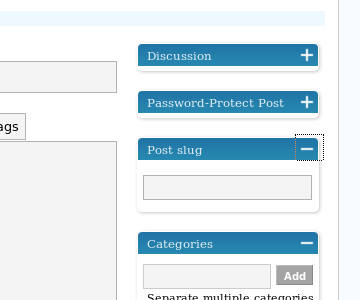
That is where the WordPress post slug feature comes into play. On the little box that appears on the right of your text editor you can manually set the URL structure for that post. As you can see from the example I mentioned, Brian knew that many of the words used in the title of the post would not be used by users searching for similar information. He decided, therefore, to use just the keywords “punctuation” and “mistakes” in the URL.
When crafting your post slug try to focus on the keywords that are used on popular search queries, and remember that the fewer keywords you use, the higher their relative value.
Some people were already aware of this trick, but I think it was worth sharing.
Thank you for the explanation of the slug. I am just starting blogging and when I was trying to make a Pretty Link it asked what was the slug. I have been trying all day to find it, and when I did what to put in it. Thanks everybody for the posts, I sure learned from everyone!
Slugging on,……..
eClaires
I know I am late to this post, but I am building a new blog and as I was entering the categories, I once again pondered the use of the slug. It is an item that has never been clear to me. Should I use a hyphen, should I use an underscore, or should I run the keywords together?
Your post at least gives me some insight into the potential power of slugs – thank you! There is surprisingly very little out there about slugs and their use.
I think Dave may be right – only testing will tell if it matters how I configure them.
Good information here, I have just created a wordpress blog and the features and functionality look mind numbingly complicated when compared to the livejournal account options that I have, so this little explanation was welcomed, thank you 🙂
Steve
Valuable advice to help the search engines find my blog. Question: I’ve got 150+ posts behind me. Should I bother tinkering with them to carve out the stop words and thus hopefully make them more web search friendly?
Excellent article on WordPress post slug. Slugs have been a hole in my knowledge… and some of my URLs show it!
As for who’s correct, Daniel or, uh, Daniel… I’m going to throw some fuel on this and say: Without testing, it’s simply opinion.
In any case, thanks again for the article and hosting the conversation. I definitely learned something.
HelloNingbo,
Darn if you’re not right! Very important post of yours. That’s so unobvious of WP! Everything else is checked by default, except that, and you’d never know there is such a thing and where to find it.
The default post slug seems to be the post name (with hyphens between words). I am using post #s for my URLs (ex. /?p=503) and not permalinks with words. I’ve now modified the slug and the URL is still my post #, not the slug, so we’re ready for Daniel’s excellent advice about focusing on key words to work.
THANKS for this useful post !
@Jane H: In fact I also looked for this “post slug” options 🙂
But in WP 2.7, it is hidden by default, so you must first click on “screen options” (top screen), then a menu scroll down and then you can select it.
Be careful that it will display the field at the bottom of the page.
Now honestly I don’t really see the difference between “post slug” and “permalink” (?) When u change one, the other changes too (!)
So I prefer to modify the permalink by editing it. Handier as just located under the main title on top of page…
I am looking everywhere and do not see anything for Post slugs. I see category slugs, and tags, but no post slugs. Have things changed for 2009?
This is very useful especially if you want a post to go viral and the default url is really long. It’s can be good to shorten it to something simple using the post slug.
Thanks Daniel, very useful.
It’s probably just me, but I can’t find how to edit the slug either in new or old pages in 2.6…. there’s nothing under the title – the only edit button is for the timestamp, and I’ve been through the advanced options…
@Pokerlover, if you use WP 2.5 you will find this right below the post title, click on “edit” there.
Is slug a plugin or why do i not have it on my admin page?
Oh the tricks you learn. How did I miss this?
I’m a blogger from China. Chinese words in the url will be encoded, so i always use post slug.
I was just like, until this week I ignored that little “post slug” option in the right side bar of the page. Then I wrote an article with a long title and tried the post slug and immediatley saw the potnetial benefits in it. I will be using it from now on for all new posts!
Chris
I knew very well about this, but never really thought of implementing it in a meaningful way. This is good advice and I appreciate it.
@ bmunch, yes I think one will have to watch out of slug clashing. When you let WordPress handle it, you have nothing to worry about, but when you go and edit each slug, you might find yourself using a slug you used a while ago and forgot about.
Like anything, using this effectively will take some good self-management. 🙂
Now I know what that is for, just tried it out quickly on my last post. Great now I can have good titles for humans.
Thanks for pointing that out.
That’s so awesome! I wondered why making a post with one title and then changing it later on produced a url with the old title. Then a quick look at one of my most recent posts showed that the slug field was filled in. This means that when left blank, wordpress fills in the slug field for you.
I’m going to use the heck out of that! That is amazingly useful… especially when my titles tend to be so long and the urls can get really messy. Thanks a million!
Daniel, thank you for clarifying the issue. I meant to say something like this, but messed up in conveying it. And your explanation added to my understanding of this subject, too.
Not trying to argue, just trying to clarify the point so other readers will not get confused. I am glad you asked the questions so I can address the points that are not clear to you specifically.
1. The more keywords you have in the URL, the smaller the relative value of each of one. Suppose Google places an algorithmic value of 10 on the URL factor of each site (just an example). If you have 10 keywords there, each of them will receive a value of 1. If you have 2 keywords, each of them will receive a 5.
2. I never talked about using the post slug to make URLs more user friendly. My purpose of making them shorter is not to make it easier for users to type (which I know happens rarely) but rather to increase the value of the important keywords while removing the non essential stuff from the URL.
3. When I say optimized here I am also referring to search engine optimization. However, that does not mean keywords research and going after them, exclusively. When you improve a small detail of your URLs which will bring more search engine traffic for one specific post, you are search engine optimizing that post.
That is why the post slug if useful, and useful to make your posts more search engine friendly. Even if changing your URL with the post slug would improve your organic traffic by only 1%, add that up for hundreds of posts and you can see that over the time this would have a strong effect on the amount of traffic you get from search engines.
Everybody, thank you very much for discussing these topics. I am a novice in blogging (1 month). Following your recommendations I just changed my permalink structure and from now on will watch my “post slug” box. I’ve read in a book, that when choosing keywords and search phrases you should not include “stop words”, such as “the”, “a”, “on”,”in”, “of”, “be”, “me”, “and”, “I”, because Google considers it irrelevant to its search results and ignores it. Also, to refrain from including it in Meta Titles and Meta keywords, links, header tags. Of course, they should be present in the post.
I was just providing a suggestion, but you seem to be trying to argue. Therefore I will ask you a few questions about your arguments because I am interested and also I want to see proof in your statements. Maybe you could make a new blog post out of it.
1. Do more keywords in your URL really dilute the value of the keywords, or do they provide more description for search engines.
2. I agree that the headline of my post on payment services is very long and probably not very user-friendly. But how often do users type in the URL directly? Am I really going to get more hits if I use less words in the headline?
3. When you use the word “optimize,” I think of search engine optimizing a website, or more specifically, going after a certain keyword phrase. The wordpress slug option wouldn’t really help with this in my opinion. For example, if you do a bunch of keyword research on WordTracker and find a long tail keyword that you want to pursue, i.e. “wedding planning checklist,” you will want to include that specific phrase in your URL, page title, article headlines, and dispursed throughout the body copy. If you use this strategy, you will find that you won’t need to use the slug plugin in the first place!
However, it is always nice to know what WordPress slug means and it’s good that you pointed it out for everyone. Thanks.
Great post. I have been using the All-in-One SEO Pack plugin. This is all of the SEO that you need to do on your blog. The post slug functionality is part of this plugin too.
OK let me use an example from your own blog which might be easier for you to understand.
One of your posts is titled: Paypal, Google Checkout, AmazonWhich Payment Service Should You Use?
The URL for that post is: /paypal-google-checkout-amazonwhich-payment-service-should-i-use/
The keywords paypal, googlecheckout and amazon are popular. The others are not.
Your URL contains 10 keywords, out of which only 3 are popular. You are diluting the value of the keywords “paypal”, “google checkout” and “amazon” by adding “which payment service you should use”.
If you used the post slug featured to make this URL like: /paypal-google-checkout-amazon/ (provided you also have backlinks and other SEO factors in place) you would receive more organic traffic for these keywords on that post.
So basically your URL is not optimized for the most popular keywords on that post.
Clear?
@Daniel:
Hopefully you aren’t going after the keyword phrase “43 Fantastic WordPress Themes.”
Keyword optimizing requires research to find out popular search keywords with low competition. I never said 43 is a popular search term.
This post slug is efficiently especially when you want to trim down the unused words in a title for search engines, such as “of”, “in”, “with”, “a”, and others. You can even have a title for the article and another one in the slug, such as the article “Top 10 List of bla bla”, and the slug “The best ideas for bla bla”. Because you care for the search results, and once the reader lands on your blog, he will see the post and decide if he/she has to read it or not.
This is because the first impression matters the most. When you see a result in Google, let’s say, you see the title, the description and the URL address. Based on these factors you make a decision: should I or shouldn’t I visit this blog? So, help your readers decide.
I have been optimizing my post slugs since my first article.
@Daniel:
When you are keyword optimizing a post or your website, you want your URLs, page titles, headlines, and body copy to feature a specific keyword phrase. If you notice in Google when you type in my company for example, “bizwidgets” you will notice Google bolds the keyword in the URL, page title, and body copy.
I was just trying to suggest a tip that if you are keyword optimizing something, your URL, page title, headline, and body copy should all include one keyword phrase, for example “blog tips”
I do like short URLs whenever possible! (when you aren’t keyword optimizing)
This is a great tip! While I have been using it blindly, I finally understand its purpose. Thanks!
haha so that’s what it was for i didn’t even know…why called it a slug…
Great tip ! I do use the Post slug each time I post.
I think I never used the default URL provided by WordPress.
So a really good tip for SEO.
bmunch, yeah it would be better to make the post different for each post.
It also depends on the URL structure you use, for instance having dates there would solve this problem.
Well they say you learn something new everyday and your post certainly woke me up. The post slug has stared me in the face for almost two years with out ever suggesting a use. Now I stumble on your blog and the light goes on.
Sorry got to go try this out on my blog.
Nick
Defiantly worth mentioning. I do use it but more as an after thought…
I use a SEO plugin to manage my headers and titles, but it’s good to know about this feature
That’s right. Slug in English is totally necessary for some hosts hosting non English blogs.
post slug is useful for the Non-English speaking countries,how about me, i’m write post in chinese, if i do not use the post slug, the urls will include chinese character
Once in a while, I use this option to edit the URL.
If I remember correctly, there’s also a WordPress plugin that can fill the slug with good keywords related to your post.
I am just wonderiing if having a post slug identical to a previous post will cause a clash…or will it just add a running number to the end.
e.g. a series of related post you are writing or a recurring theme post.
Daniel Errante, this feature affects the URL only, so I am not sure why you mentioned page titles, headlines and body copy.
As far as the URL goes, the fewer and more focused keywords you have there, the better.
Suppose your post is titled “37 Fantastic Tips for Web Marketing.”
Including the words “37, fantastic and for on the URL would be useless since very few people would search for them. Secondly, it might also be counter productive since these words will dilute the value of the keywords.
You’ve brought up excellent point. I’ve been blogging almost a year now, and always wondered what’s that function for. Great Post.
Neat. I didn’t know what that was for. Now thanks to you I know how useful this feature is. Thanks for the nice tip.
I generally use a short slug if it’s a post I know I’ll be linking to in the future a lot.
Also, I’m told that WordPress now automatically includes a function to redirect a post if you change the slug, even after it’s published. If that’s not true, you can try the Redirection plugin by Urban Giraffe (under Manage — Redirection — Options, you can check a box to have it automatically issue a 301 redirect when you change a post slug; it can also take care of URL canonicalization and other redirect issues without playing with .htaccess).
Most of the time I let the URL be the default slug, but I have used the slug to shorten a very long URL or to experiment a little with different keywords.
I generally like to leave it matching the post title in case someone remembers the title, but is having a hard time finding the post. If they’ve been to my blog enough they can probably figure out the URL. I doubt it happens that often, but it’s been my rationale for letting the post slug match the post title.
It’s still nice to be able to change the post slug when you want.
I didn’t know about this little trick. I definitely am going to start using this. Thanks for sharing.
You know, I use this on pages but never have on posts. Now I know!
Well, I have seen it every-time before posting, but actually haven’t really noticed what this feature is about!
Wow, Now The longer urls can be well managed! And if used wisely we can just create a good amount of curiousness and get people to visit the post! Good one! 🙂
There are many advantages of choosing a short url. Urls can often get broken in emails and message forums. Being able to stipulate url, means you can choose a really long title without worrying
Yes, thats indeed a great feature. But be careful for changing post slug for older posts or else links to them will return a 404 error. I will be using it for future posts from now on.
This is so cool, Daniel.
I didn’t even know what that was for. I love WordPress.
Now I can stop writing goofy headlines and use that post slug thingee.
Thanks for the great tips,
Paula